

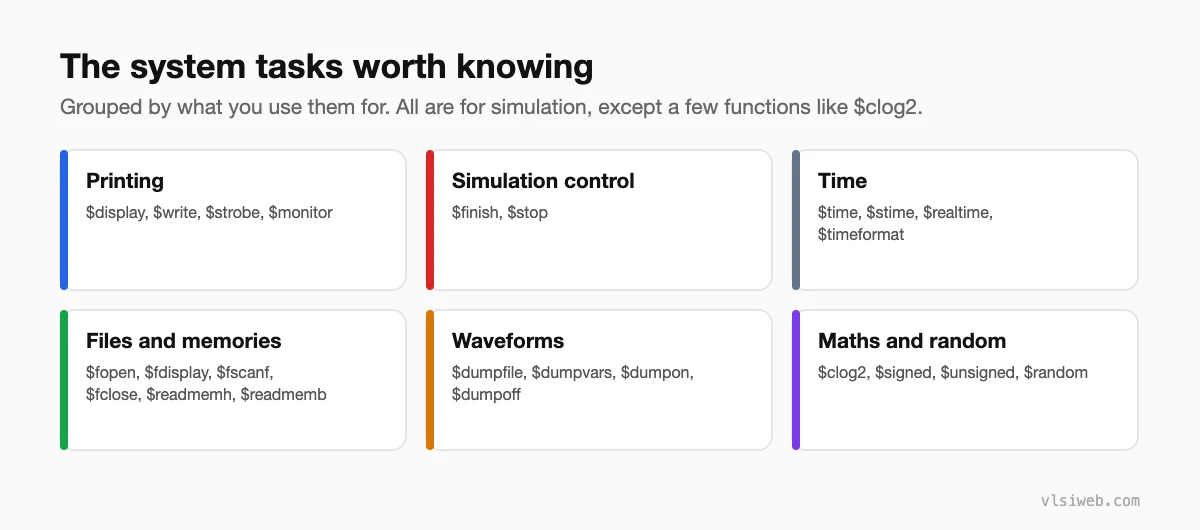
The short answer: System tasks and functions are built-in commands that start with $. The ones you’ll use most are $display, $monitor and $strobe for printing, $finish to end the simulation, $time for the current time, $readmemh and $readmemb to load memories from files, $dumpfile and $dumpvars for waveforms, $random for random numbers, and $clog2 and $signed in RTL. Apart from a few functions like $clog2 (and $readmemh for FPGA memory initialisation), they’re for simulation only.
System tasks are the testbench’s tools: they print, load files, dump waveforms and stop the simulation. Here are the ones I actually use, with the details that trip people up.
- Overview
- Printing
- Ending the simulation
- Files and memories
- Waveforms
- Random numbers
- Functions you can use in RTL
Table of Contents
Part 1: Overview
Part 2: Printing
$display("t=%0t a=%h b=%d", $time, a, b);   // prints now, adds a newline
$write  ("no newline ");                       // like $display without newline
$strobe ("q=%b", q);                          // prints at the end of the time step
$monitor("t=%0t q=%b", $time, q); // prints whenever an argument changes| Format | Meaning |
|---|---|
| %b %o %d %h | Binary, octal, decimal, hex |
| %0d | Decimal without leading spaces |
| %t, %0t | Time (formatted by $timeformat) |
| %s | String |
| %m | Hierarchical name of the current scope |
| %e %f | Real numbers |
$display prints in the active region, so it can show values before non-blocking updates; $strobe shows final values. Only one $monitor is active at a time; use $monitoroff and $monitoron to control it.
Part 3: Ending the simulation
initial begin
  #10_000;
  $display("TIMEOUT");
  $finish;          // ends the simulation
end
$stop pauses the simulation in interactive mode instead. I always add a timeout like this so a hung test fails instead of running forever.
Part 4: Files and memories
reg [7:0] rom [0:255];
initial $readmemh("rom.hex", rom);         // one hex value per line

integer fd;
initial begin
  fd = $fopen("results.txt", "w");
  $fdisplay(fd, "%h", data);
  $fclose(fd);
end
$readmemh is the standard way to load test vectors and memory contents. FPGA synthesis tools also accept it to initialise block RAM and ROM contents.
Part 5: Waveforms
initial begin
  $dumpfile("wave.vcd");
  $dumpvars(0, tb);      // 0 = all levels below tb
end
VCD files can be opened in GTKWave or Surfer. Commercial simulators have faster, more compact formats, but VCD works everywhere.
Part 6: Random numbers
integer seed = 42;
r = $random(seed);              // 32-bit signed
v = $unsigned($random) % 16;   // 0 to 15
Pass a seed variable so a failing test can be reproduced. SystemVerilog adds $urandom, $urandom_range and constrained randomisation, which are much better for real verification.
Part 7: Functions you can use in RTL
$clog2(N): ceiling log2, for address widths.$signed(x)and$unsigned(x): change how an expression is interpreted.$bits(x)(SystemVerilog): width of a signal or type.
Practise this on VLSI Forge
I built VLSI Forge so you can write RTL in your browser, run it on a real simulator and check every signal in the waveform. Free, nothing to install.
Previous in my Verilog series: parameter, localparam and define. Next: Coding guidelines for synthesisable RTL.
FAQ
What is the difference between $display and $monitor?
$display prints once when it runs; $monitor prints every time one of its arguments changes.
What is the difference between $display and $strobe?
$display prints in the active region; $strobe prints at the end of the time step, after non-blocking assignments have updated.
Is $readmemh synthesisable?
ASIC tools ignore it, but FPGA tools accept it to initialise memory contents.
How do I dump waveforms in Verilog?
Call $dumpfile with a file name and $dumpvars with a depth and scope in an initial block.
