
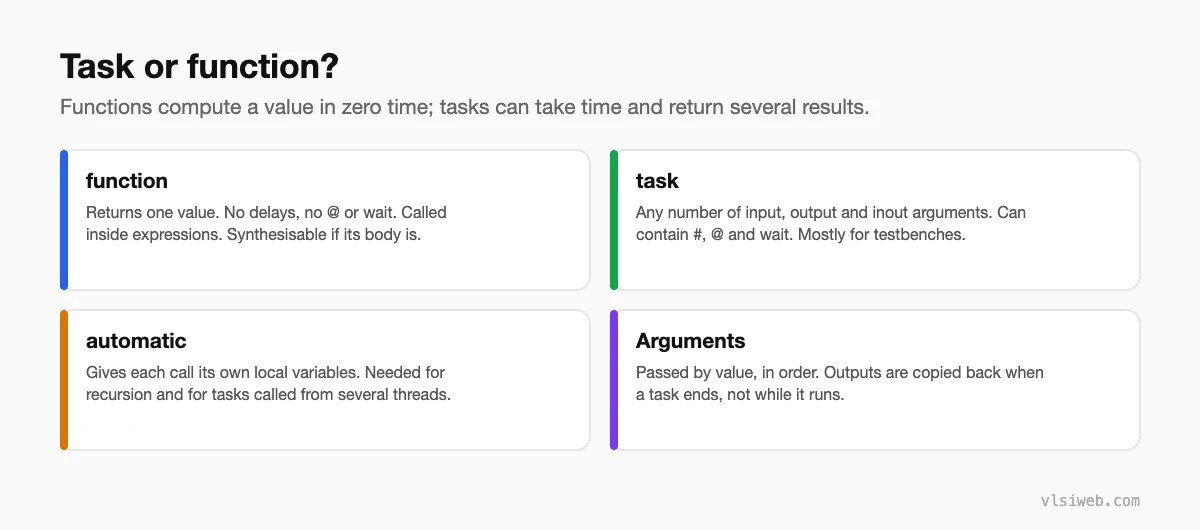
The short answer: A Verilog function returns a single value, executes in zero simulation time and can’t contain delays or event controls, so it can be used inside expressions and in synthesisable RTL. A task can have any number of input, output and inout arguments and can consume time with #, @ or wait, which makes it ideal for testbench procedures like driving a bus transaction. Declare both as automatic when they might be called recursively or from several threads at once.
Tasks and functions are how you stop copying the same code everywhere. In RTL I mostly use functions for small pieces of combinational logic; in testbenches, tasks do most of the work. This post combines my older posts on tasks, functions and argument passing.
- Task or function?
- Functions
- Tasks
- How arguments are passed
- Static vs automatic
Table of Contents
Part 1: Task or function?
Part 2: Functions
// even parity of a byte
function parity8;
  input [7:0] d;
  begin
    parity8 = ^d;            // assign to the function name to return
  end
endfunction

// ANSI style (Verilog-2001), with a vector return
function [3:0] count_ones (input [7:0] d);
  integer i;
  begin
    count_ones = 0;
    for (i = 0; i < 8; i = i + 1)
      count_ones = count_ones + d[i];
  end
endfunction

assign p   = parity8(data);
assign cnt = count_ones(data);- At least one input, exactly one return value.
- No #, @ or wait; no calls to tasks; no non-blocking assignments.
- Synthesises to combinational logic, inlined wherever it’s called.
- Constant functions can size things at elaboration, e.g. computing a log2 for widths (today, $clog2 does this).
Part 3: Tasks
// testbench task: drive one write on a simple bus
task bus_write (input [7:0] addr, input [31:0] data);
  begin
    @(posedge clk);
    sel   <= 1'b1;
    wr    <= 1'b1;
    a     <= addr;
    wdata <= data;
    @(posedge clk);
    sel   <= 1'b0;
    wr    <= 1'b0;
  end
endtask

initial begin
  bus_write(8'h10, 32'hDEAD_BEEF);
  bus_write(8'h14, 32'h0000_0001);
end
Tasks can also be used in RTL if they contain no timing controls, but a function or a small module is usually clearer.
Part 4: How arguments are passed
- Arguments are copied in when the task or function is called, in the order they’re declared.
- Task outputs are copied back to the caller only when the task finishes, not while it’s running. If you need to see a value change during the task, drive a module-level signal directly instead.
- Verilog has no pass-by-reference; SystemVerilog adds
refarguments for that.
task automatic read_reg (input [7:0] addr, output [31:0] data);
  begin
    @(posedge clk) begin sel <= 1; wr <= 0; a <= addr; end
    @(posedge clk) data = rdata;     // copied to the caller at the end
    sel <= 0;
  end
endtask
Part 5: Static vs automatic
By default, Verilog tasks and functions are static: there is one copy of their local variables, shared by every call. If two initial blocks call the same task at the same time, they overwrite each other’s variables. Declaring them automatic gives each call its own storage, which is also required for recursion:
function automatic integer factorial (input integer n);
  factorial = (n <= 1) ? 1 : n * factorial(n - 1);
endfunction
I declare testbench tasks automatic by default.
Practise this on VLSI Forge
I built VLSI Forge so you can write RTL in your browser, run it on a real simulator and check every signal in the waveform. Free, nothing to install.
RTL Design problems · Daily challenge
Previous in my Verilog series: Delays and timing checks. Next: parameter, localparam and define.
FAQ
What is the difference between a task and a function in Verilog?
A function returns one value in zero time and can’t contain timing controls; a task can have several outputs and can wait with #, @ or wait.
Are functions synthesisable?
Yes, if their body is synthesisable. They become combinational logic wherever they’re called.
Can a function call a task?
No. A function can call other functions, but not tasks, because tasks may consume time.
What does automatic mean?
Each call gets its own copy of local variables, which allows recursion and safe calls from parallel threads.
