

The short answer: Setup and hold are the two basic timing checks on every register-to-register path. The setup check makes sure data launched on one clock edge arrives at the capture flop at least its setup time before the next capturing edge; it’s checked with the slowest (max) delays. The hold check makes sure data launched on an edge doesn’t reach the capture flop so fast that it corrupts the value being captured on the same edge; it’s checked with the fastest (min) delays. Setup depends on the clock period; hold doesn’t.
Almost every timing question comes back to these two checks. This post explains them with the equations, a waveform and a worked example. It combines my older separate posts on setup time and hold time.
- The window around the edge
- The setup check
- The hold check
- A worked example
- Which corners check what
Table of Contents
Part 1: The window around the edge
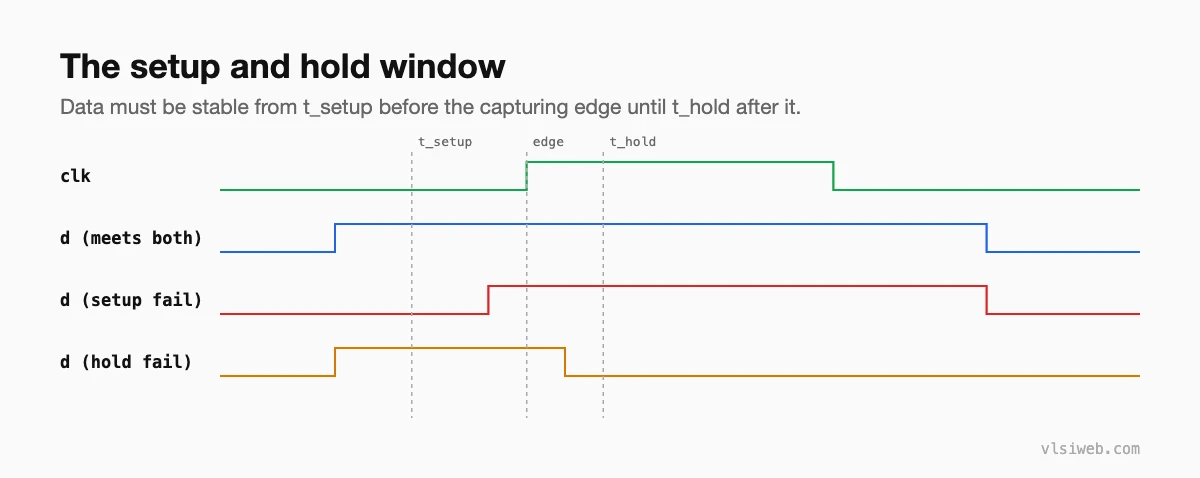
Setup and hold times are properties of the capturing flop, characterised in its Liberty library. Inside the flop they come from the time the internal latches need to capture data cleanly. If data changes inside the window, the flop may capture the wrong value or go metastable.
Part 2: The setup check
arrival (max)  = launch clock latency + t_clk-to-q + t_logic(max) + t_wire(max)
required       = T + capture clock latency - t_setup - setup uncertainty
setup slack    = required - arrival        (must be >= 0)
Setup compares the data launched at one edge with the next capturing edge, one period later. A faster clock (smaller T) makes setup harder; that’s why the maximum frequency is set by the worst setup path.
Part 3: The hold check
arrival (min)  = launch clock latency + t_clk-to-q(min) + t_logic(min) + t_wire(min)
required       = capture clock latency + t_hold + hold uncertainty
hold slack     = arrival - required        (must be >= 0)
Hold compares data launched at an edge with the same edge at the capture flop: the new data must not arrive before the capture flop has finished taking the old value. T doesn’t appear, so slowing the clock never fixes a hold violation.
Part 4: A worked example
| Quantity | Value |
|---|---|
| Clock period T | 2.0 ns |
| Launch latency / capture latency | 0.30 / 0.40 ns |
| clk-to-q (max / min) | 0.12 / 0.08 ns |
| Logic + wire delay (max / min) | 1.50 / 0.05 ns |
| Setup / hold time | 0.06 / 0.03 ns |
| Uncertainty (setup / hold) | 0.10 / 0.05 ns |
setup: arrival  = 0.30 + 0.12 + 1.50          = 1.92 ns
       required = 2.00 + 0.40 - 0.06 - 0.10   = 2.24 ns
       slack    = 2.24 - 1.92                 = +0.32 ns  (met)

hold:  arrival  = 0.30 + 0.08 + 0.05          = 0.43 ns
       required = 0.40 + 0.03 + 0.05          = 0.48 ns
       slack    = 0.43 - 0.48                 = -0.05 ns  (violated)
Notice that the capture clock arriving later (positive skew of 0.1 ns) helped setup and hurt hold, which is exactly why this path fails hold.
Part 5: Which corners check what
- Setup is worst with slow cells and wires: slow process, low voltage, and the RC corner with most delay.
- Hold is worst with fast cells and wires: fast process, high voltage, minimum RC.
- At sign-off, both are checked in every corner, because skew and wire delay can change which corner is worst for a given path.
More in corners, OCV and variation.
Practise this on VLSI Forge
I built VLSI Forge so you can write RTL in your browser, run it on a real simulator and check every signal in the waveform. Free, nothing to install.
Previous in my STA series: What is STA? Timing paths. Next: Arrival time, required time and slack.
FAQ
What is setup time?
The minimum time data must be stable at a flip-flop’s input before the active clock edge for it to be captured reliably.
What is hold time?
The minimum time data must stay stable after the active clock edge.
Why doesn’t clock frequency affect hold?
Because the hold check compares launch and capture on the same clock edge, so the period cancels out.
How do you fix setup and hold violations?
Setup: reduce path delay or relax the clock. Hold: add delay on the short path. See the post on fixing timing violations.
