

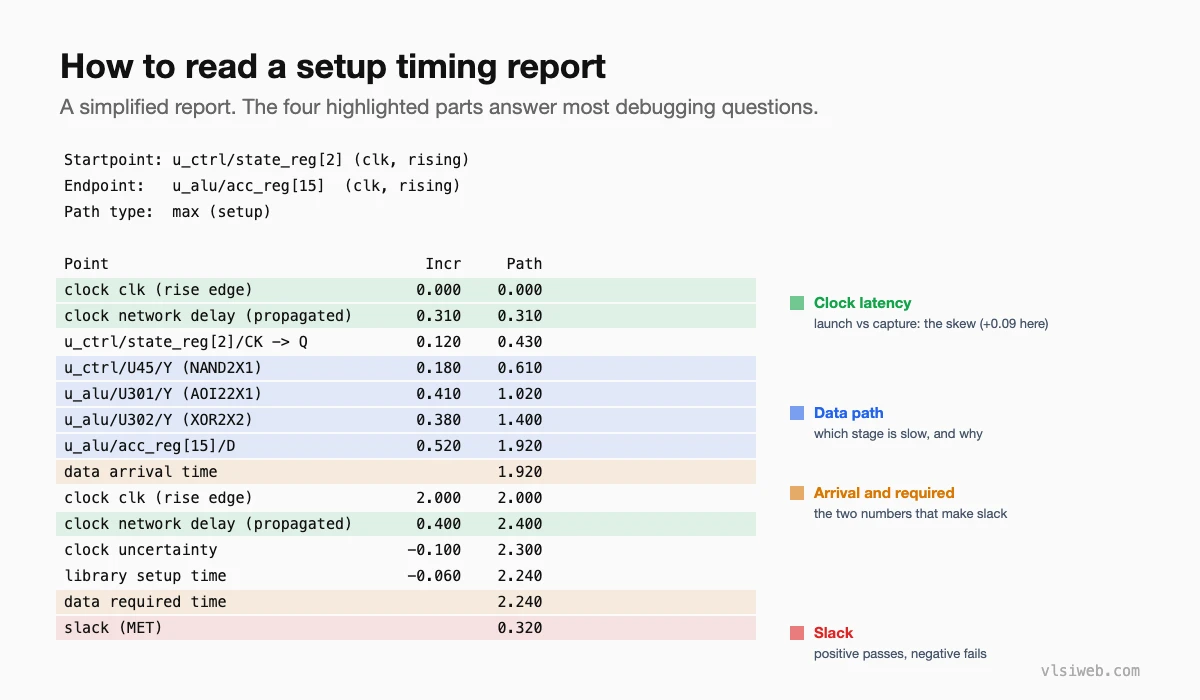
The short answer: A timing report shows one path from startpoint to endpoint: the launch clock latency, each cell and wire delay along the data path, the arrival time, then the capture clock latency, uncertainty and setup (or hold) time that give the required time, and finally the slack. To debug a violation, I check the constraint first, then compare launch and capture clock latency (skew), then look for the stage that takes an unusual share of the delay: a weak driver, a long wire, a large fan-out or deep logic. That points to the right fix.
Timing reports look dense, but every one has the same structure. Once you know where to look, most violations explain themselves within a minute. This post replaces my older post on timing violations.
- Anatomy of a report
- My debugging order
- Useful report options
- Typical causes and fixes
- Don’t forget the other violations
Table of Contents
Part 1: Anatomy of a report
Part 2: My debugging order
- 1. Is the constraint right? Correct clock, correct period, no missing exception, sensible I/O delays. A wrong constraint makes everything else irrelevant.
- 2. Is the clock the problem? Compare launch and capture network delay. Large skew points to CTS, not the data path.
- 3. Where is the delay? Look for one stage much slower than the others, or many small stages (deep logic).
- 4. Why is that stage slow? Check the input transition, output load, fan-out and wire length in the detailed report.
- 5. Is it the corner? Check which corner and mode this path fails in, and whether other corners pass.
Part 3: Useful report options
report_timing -delay_type max -max_paths 20 -nworst 1
report_timing -delay_type min -to [get_pins u_alu/acc_reg*/D]
report_timing -from u_ctrl/state_reg[2]/CK -to u_alu/acc_reg[15]/D \
              -input_pins -nets -transition_time -capacitance
report_constraint -all_violators
report_global_timing          ;# WNS, TNS and counts per group
Options vary slightly between tools, but every STA tool can add transitions, capacitances, fan-out and net lengths to the report; they’re usually what explains a slow stage.
Part 4: Typical causes and fixes
| What you see | Likely cause | Fix |
|---|---|---|
| One stage with a huge delay and slow transition | Weak driver on a big load | Upsize, buffer, split the fan-out |
| Large wire delay | Cells placed far apart | Placement, buffering, higher metal layer |
| Many small stages | Deep logic | Restructure, pipeline, RTL change |
| Big difference in clock latency | Unbalanced clock tree | CTS fix, useful skew |
| Fails only at one corner | Corner-specific sensitivity | Fix at that corner, re-check the others |
| Hold fail with tiny data delay | Short path plus positive skew | Add delay on the data path |
The PD-side view of the same fixes is in timing closure and ECOs.
Part 5: Don’t forget the other violations
Max transition and max capacitance violations often cause the timing violations, so fix them first. Clock gating, recovery/removal and minimum pulse width violations are reported separately; run a full constraint report, not just setup and hold.
Practise this on VLSI Forge
I built VLSI Forge so you can write RTL in your browser, run it on a real simulator and check every signal in the waveform. Free, nothing to install.
Static Timing Analysis problems · Daily challenge
Previous in my STA series: Corners, OCV and variation. Next: Clock gating checks.
FAQ
How do I read a timing report?
Follow the path from the launch clock through each stage to the arrival time, then the capture clock, uncertainty and setup or hold time to the required time; the difference is the slack.
What should I check first when a path fails?
The constraint. Then clock skew, then which stage contributes most delay and why.
Why fix max transition violations first?
Slow transitions increase the delay of every following stage, so they often cause the setup violations you’re seeing.
What does report_constraint -all_violators show?
Every violated constraint in the design: setup, hold, transition, capacitance and other checks.
