

The short answer: For every timing path, STA computes an arrival time (when the data actually reaches the endpoint, adding clock latency, clock-to-q, cell and wire delays) and a required time (when it must arrive, from the capture clock edge, latency, setup or hold time and uncertainty). Slack is the difference: required minus arrival for setup, arrival minus required for hold. Positive slack means the path passes with margin; negative slack is a violation. The clock period sets the setup required time, so the worst setup slack determines the maximum frequency.
Arrival time, required time and slack are the three numbers on every timing report. Once you can compute them by hand, reading a report becomes easy. This post combines my older posts on data arrival time, data required time and clock period.
- One path on a timeline
- Arrival time
- Required time
- Slack and the clock period
- WNS, TNS and endpoints
- Common confusions
Table of Contents
Part 1: One path on a timeline
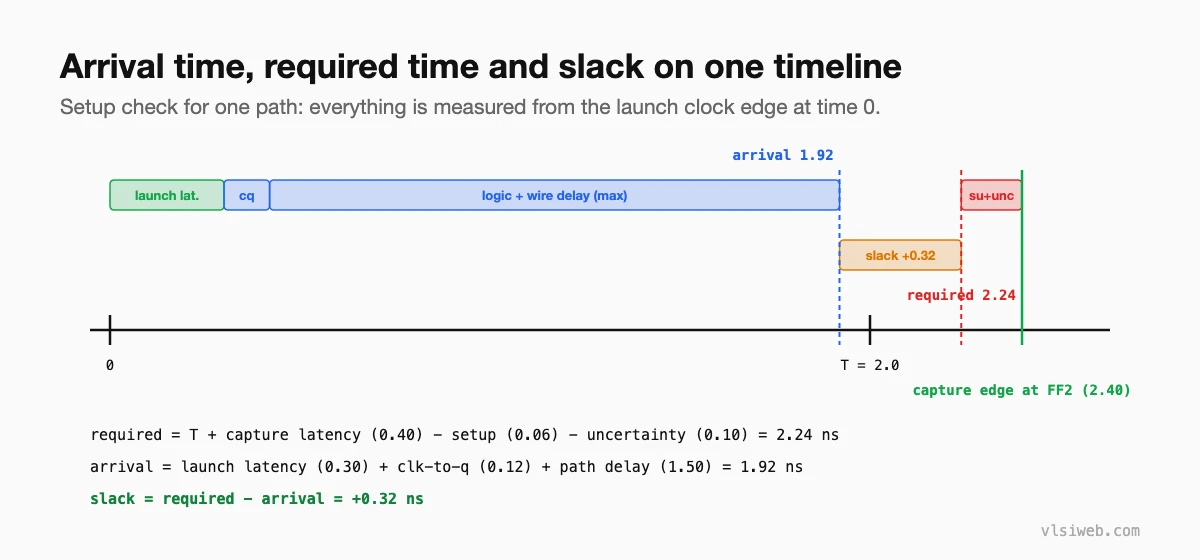
Part 2: Arrival time
Arrival time accumulates from the clock source: source latency, the launch clock tree, the launch flop’s clock-to-q, then every cell and wire delay along the data path. For setup, STA uses the maximum delays (and the latest-arriving input at each multi-input gate); for hold, the minimum.
Part 3: Required time
- Setup: capture edge time (one period later for a single-cycle path) + capture clock latency − setup time − setup uncertainty.
- Hold: capture edge time (the same edge) + capture clock latency + hold time + hold uncertainty.
- At output ports, the required time comes from set_output_delay instead of a flop’s setup time.
Part 4: Slack and the clock period
Setup slack = required − arrival; hold slack = arrival − required. Because the period appears in the setup required time, the minimum period for a path is the period that makes its setup slack exactly zero:
T_min = launch latency + t_cq + t_path(max) + t_setup + uncertainty - capture latency
f_max = 1 / T_min   (over the worst path in the design)
With the example numbers: T_min = 0.30 + 0.12 + 1.50 + 0.06 + 0.10 − 0.40 = 1.68 ns, about 595 MHz.
Part 5: WNS, TNS and endpoints
| Metric | Meaning |
|---|---|
| WNS | Worst negative slack: the single worst path |
| TNS | Total negative slack: sum of negative slack over all failing endpoints |
| Failing endpoints | How many endpoints violate |
| Slack histogram | How many paths are close to failing |
WNS says how hard the worst problem is; TNS and the failing-endpoint count say how widespread the problem is. Both matter when deciding how to fix it.
Part 6: Common confusions
- Slack is per path endpoint, not per cell. A cell can sit on several paths with different slack.
- Positive hold slack doesn’t mean the path is fast; it means it’s slow enough.
- A path can meet setup at one corner and fail at another; always check which corner a report is for.
Practise this on VLSI Forge
I built VLSI Forge so you can write RTL in your browser, run it on a real simulator and check every signal in the waveform. Free, nothing to install.
Previous in my STA series: Setup and hold checks. Next: Cell and wire delay calculation.
FAQ
What is slack in STA?
The margin between when data must arrive and when it actually arrives. Positive slack passes; negative slack is a violation.
How is required time calculated?
For setup: capture edge time plus capture latency, minus setup time and uncertainty. For hold: capture edge time plus capture latency, plus hold time and uncertainty.
How do you find the maximum frequency?
Find the minimum period that gives zero setup slack on the worst path; f_max is its inverse.
What is the difference between WNS and TNS?
WNS is the worst slack of any path; TNS is the sum of negative slack over all failing endpoints.
