

The short answer: A blocking assignment (=) updates the variable immediately, so the next statement sees the new value. A non-blocking assignment (<=) reads the right-hand side immediately but updates the left-hand side at the end of the time step, after all blocks triggered by the same event have run. Use non-blocking in clocked always blocks (flip-flops) and blocking in combinational always blocks, and never mix the two on the same variable.
If I could give a Verilog beginner only one rule, it would be the one in the answer above. Getting it wrong produces code that simulates one way and synthesises another, or simulates differently on different simulators.
This post also covers the Verilog scheduling regions, which explain why the rule works. It replaces my older separate post on event regions.
- The same code, two circuits
- Why it works: Verilog’s scheduling regions
- The race condition blocking assignments cause
- The rules I follow
- $display vs $strobe
Table of Contents
Part 1: The same code, two circuits
// non-blocking: a two-stage shift register
always @(posedge clk) begin
  q1 <= d;
  q2 <= q1;    // old q1
end

// blocking: q2 gets the NEW q1, so both equal d
always @(posedge clk) begin
  q1 = d;
  q2 = q1;
end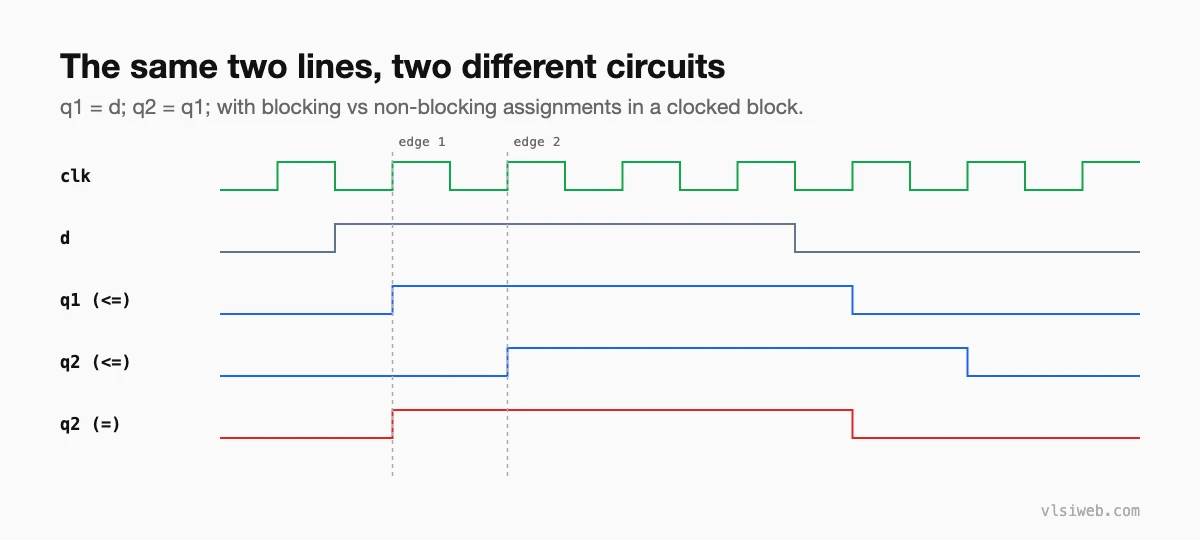
With non-blocking assignments, both right-hand sides are read before either variable changes, which is exactly how real flip-flops behave: they all sample at the same edge. With blocking assignments, the order of statements changes the hardware.
Part 2: Why it works: Verilog’s scheduling regions
In each time step, the simulator processes events in regions. Simplified:
| Region | What happens |
|---|---|
| Active | Blocking assignments, continuous assignments, evaluating the right-hand side of <=, $display |
| Inactive | Events delayed by #0 |
| NBA | Left-hand sides of non-blocking assignments are updated |
| Monitor | $monitor and $strobe print the final values |
| Future | Time advances to the next scheduled event |
Because all non-blocking updates happen together in the NBA region, every clocked block sees the “old” values of every register, no matter in which order the simulator runs the blocks. Updates may trigger new active events, and the loop repeats until the time step is stable.
Part 3: The race condition blocking assignments cause
always @(posedge clk) a = b;
always @(posedge clk) b = a;     // swap? depends on which block runs first
The simulator can run these two blocks in either order, so the result is undefined: different simulators may disagree. With <= in both, the registers swap correctly every time.
Part 4: The rules I follow
- Clocked always blocks: non-blocking (<=) only.
- Combinational always blocks: blocking (=) only. Using <= here can need extra delta cycles and confuses readers.
- Never mix = and <= on the same variable, and never assign one variable from two blocks.
- Temporary variables inside a clocked block (computed and used in the same block) can use = if you’re careful, but a separate combinational block is usually clearer.
- Testbenches: drive DUT inputs with <= at clock edges, or away from the active edge, to avoid races with the DUT.
Part 5: $display vs $strobe
initial begin
  a = 0;
  a <= 1;
  $display("display: %0d", a);   // prints 0 (active region)
  $strobe ("strobe:  %0d", a);   // prints 1 (after NBA)
end
This is a favourite interview question, and the scheduling table above explains it.
Practise this on VLSI Forge
I built VLSI Forge so you can write RTL in your browser, run it on a real simulator and check every signal in the waveform. Free, nothing to install.
Previous in my Verilog series: initial and always blocks. Next: if, case and loops.
FAQ
Why use non-blocking assignments for flip-flops?
Because all flip-flops sample at the same clock edge. Non-blocking assignments read every right-hand side before updating any register, which models that exactly and avoids races.
Can I use blocking assignments in a clocked block?
You can, but the order of statements then changes the hardware, and other blocks reading those variables can race. Stick to non-blocking.
What happens if I use <= in combinational logic?
It usually still simulates correctly, but needs extra delta cycles and can hide intent. Use = in always @(*).
What is the NBA region?
The part of a Verilog time step where the left-hand sides of all non-blocking assignments are updated, after all active events.
