

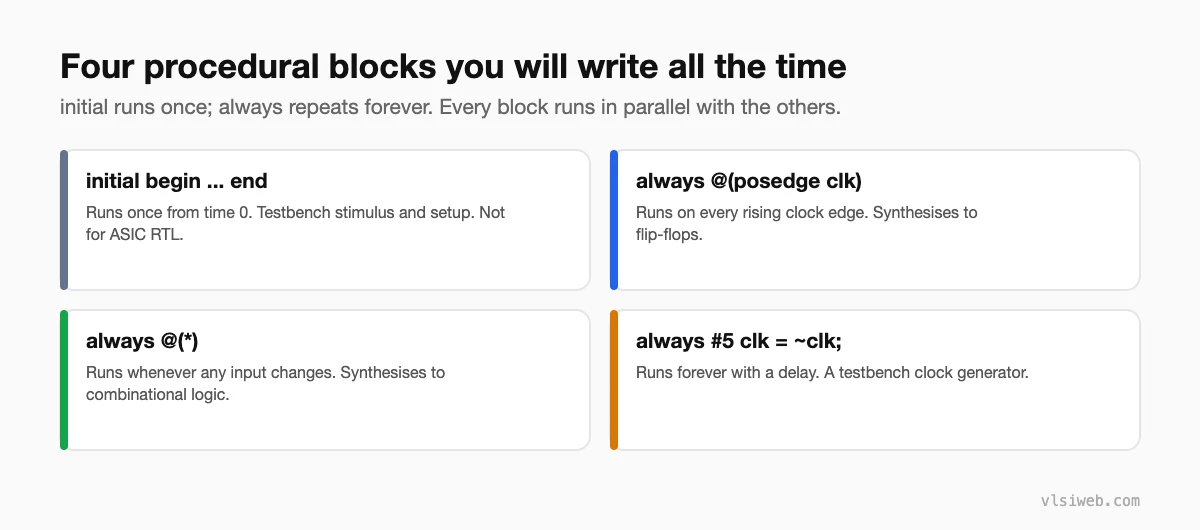
The short answer: Verilog has two procedural blocks. An initial block runs once, starting at time zero, and is used mainly in testbenches. An always block repeats forever; its event control decides when it runs. always @(posedge clk) describes flip-flops, always @(*) describes combinational logic, and always with a delay (like always #5 clk = ~clk) generates testbench clocks. All blocks in a design run concurrently with each other.
Procedural blocks are where most of your RTL will live. The statements inside a block run in order, like software, but the blocks themselves all run at the same time, like hardware. Keeping those two ideas separate is the key to this topic.
- The four blocks you’ll use
- initial blocks
- always blocks
- Event control: @, # and wait
- begin-end vs fork-join
- Rules I follow in RTL
Table of Contents
Part 1: The four blocks you’ll use
Part 2: initial blocks
initial begin
  rst_n = 1'b0;
  a     = 8'd0;
  #20 rst_n = 1'b1;      // release reset after 20 time units
  #100 $finish;
end
An initial block starts at time zero and runs to the end once. A module can have several, and they all start together. Synthesis tools for ASICs ignore them; FPGA tools can use simple initial assignments as power-up values for registers, but I still prefer an explicit reset.
Part 3: always blocks
// sequential: flip-flops
always @(posedge clk or negedge rst_n)
  if (!rst_n) q <= 1'b0;
  else        q <= d;

// combinational: logic
always @(*) begin
  y = a & b;
  if (sel) y = c;
end
An always block with no event control or delay (always y = ~y;) loops forever at time zero and hangs the simulator. Every always block needs an @ or a # to let time move.
Part 4: Event control: @, # and wait
| Control | Example | Meaning |
|---|---|---|
| Edge | @(posedge clk) | Wait for a rising edge |
| Any change | @(a or b), @(*) | Wait for any listed signal to change |
| Delay | #10 | Wait 10 time units (simulation only) |
| Level | wait (ready) | Wait until the condition is true |
| Named event | -> done; @(done); | Trigger and wait for a named event (testbenches) |
Part 5: begin-end vs fork-join
Statements between begin and end run one after another. Statements between fork and join start together, and the block finishes when all of them finish. fork-join is for testbenches only:
initial fork
  #10 a = 1;
  #20 b = 1;     // b changes at 20, not 30
join
Part 6: Rules I follow in RTL
- One clocked always block per group of related registers, and one always @(*) for combinational logic.
- Never assign the same variable from two always blocks. In simulation it’s a race; in synthesis it’s multiple drivers.
- Non-blocking (<=) in clocked blocks, blocking (=) in combinational blocks. Next post: blocking vs non-blocking.
- Name blocks when it helps debugging:
always @(posedge clk) begin : p_ctrl. - Avoid procedural assign/deassign and force/release in RTL. They’re for testbenches and debug.
Practise this on VLSI Forge
I built VLSI Forge so you can write RTL in your browser, run it on a real simulator and check every signal in the waveform. Free, nothing to install.
RTL Design problems · Daily challenge
Previous in my Verilog series: Dataflow modelling and continuous assignments. Next: Blocking vs non-blocking assignments.
FAQ
What is the difference between initial and always?
initial runs once from time zero; always repeats forever, triggered by its event control.
Is an initial block synthesisable?
Not for ASICs. FPGA tools can use simple initial values for registers, but design with a reset to be safe.
Can I have multiple always blocks in one module?
Yes, as many as you need. They run concurrently. Just don’t assign the same variable from more than one.
What is always @(*)?
An always block that runs whenever any signal it reads changes. It’s the standard way to write combinational logic in a procedural block.
