Close Menu
VLSI Web
  • Home
    • About Us
    • Contact Us
    • Privacy Policy
  • Analog Design
  • Digital Design
    • Digital Circuits
    • Verilog
    • VHDL
    • System Verilog
    • UVM
  • Job Roles
    • RTL Design
    • Design Verification
    • Physical Design
    • DFT
    • STA
  • Interview Questions
  • Informative
Facebook X (Twitter) Instagram LinkedIn
Instagram LinkedIn WhatsApp Telegram
VLSI Web
  • Home
    • About Us
    • Contact Us
    • Privacy Policy
  • Analog Design
  • Digital Design
    • Digital Circuits
    • Verilog
    • VHDL
    • System Verilog
    • UVM
  • Job Roles
    • RTL Design
    • Design Verification
    • Physical Design
    • DFT
    • STA
  • Interview Questions
  • Informative
VLSI Web
Interview Questions

TCL Interview Questions for VLSI Engineers

Raju GorlaBy Raju Gorla6 November 2024Updated:20 March 2026No Comments12 Mins Read
TCL Interview Questions
Share
Facebook Twitter LinkedIn Email Telegram WhatsApp

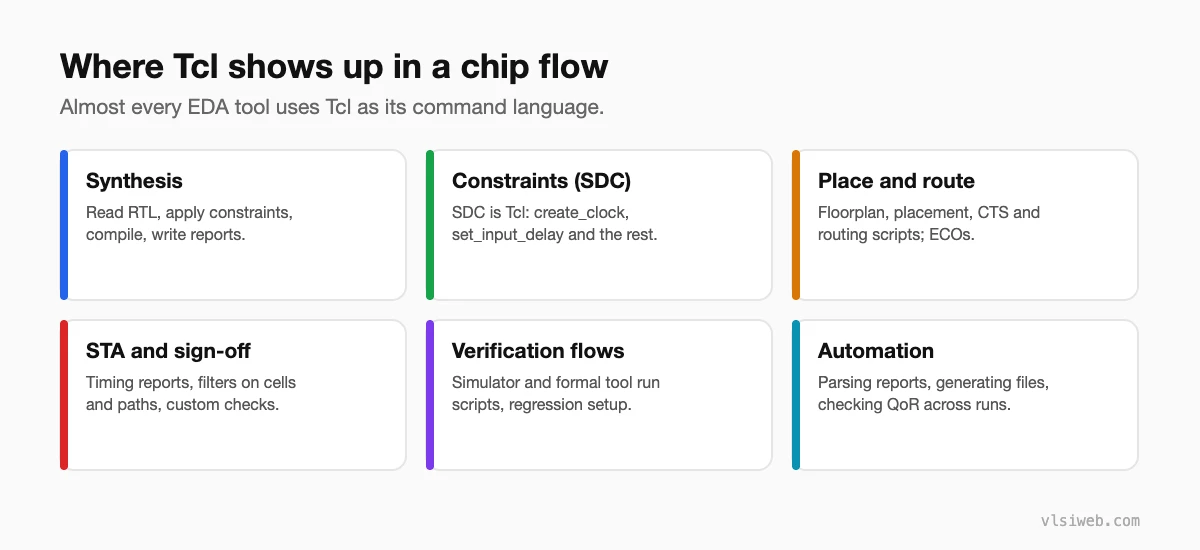
I’ve compiled 40 TCL interview questions from EDA tool automation and scripting roles over the past 12 years. If you’re interviewing for a design automation engineer role, a VLSI backend position, or any job where you’ll script tools (Design Compiler, Innovus, Vivado, PrimeTime, Questa), you’ll see variations of almost every question here. TCL is the lingua franca of chip design—everyone uses it, but few use it well.

💡 This is for: Design automation engineers, EDA flow developers, VLSI designers scripting tools, and anyone automating chip design, P&R, or verification workflows.

Table of Contents

  • Quick Navigation
  • Section 1: TCL Basics (Q1–Q10)
    • Q1. What is TCL? Why do EDA tools use it?
    • Q2. Variable assignment and substitution—set, $, [], {}
    • Q3. String operations—length, index, range, match, toupper, tolower
    • Q4. Arithmetic with expr—integer vs floating-point, incr
    • Q5. Procedure definition—arguments, default values, return
    • Q6. Global vs local scope—uplevel and upvar
    • Q7. List operations—list, lindex, llength, lappend, lrange, foreach
    • Q8. Regular expressions in TCL—regexp, regsub
    • Q9. Error handling—catch, error, try (TCL 8.6)
    • Q10. Source command—structuring TCL projects
  • Section 2: Control Flow & Data Structures (Q11–Q20)
    • Q11. if/elseif/else syntax—common mistake with braces
    • Q12. Switch statement in TCL
    • Q13. While and for loops—common patterns
    • Q14. Break and continue in loops
    • Q15. Array (associative array)—set/get/exists/names/unset
    • Q16. Dict operations (TCL 8.5+)—dict set/get/exists/keys/values
    • Q17. String map and format—replacing substrings, printf-style
    • Q18. Nested data structures—list of dicts, dict of lists
    • Q19. File I/O—open/puts/gets/close, reading line by line
    • Q20. Executing external commands—exec, catching output
  • Section 3: EDA Tool TCL (Q21–Q30)
    • Q21. Design Compiler TCL flow—from read to write
    • Q22. get_cells/get_nets/get_pins/get_ports—the query commands
    • Q23. SDC (Synopsys Design Constraints) in TCL
    • Q24. Innovus TCL flow for P&R
    • Q25. Vivado TCL automation
    • Q26. Parsing reports in TCL—extracting timing/area data
    • Q27. Batch running simulations with TCL
    • Q28. PrimeTime TCL—read_sdc, report_timing, update_timing
    • Q29. SpyGlass batch mode—running lint/CDC checks
    • Q30. Writing a reusable TCL procedure library
  • Section 4: Advanced TCL (Q31–Q40)
    • Q31. Namespace in TCL—avoiding proc name collisions
    • Q32. Package mechanism—distributing TCL libraries
    • Q33. Object-oriented TCL—TclOO (8.6+) or SNIT
    • Q34. Lsort with -command—custom sorting
    • Q35. Binary data in TCL—binary scan and binary format
    • Q36. Event-driven TCL—Tk, after, fileevent
    • Q37. Expect—automating interactive EDA tool sessions
    • Q38. Making TCL scripts portable across Linux/Windows/Mac
    • Q39. Performance optimization in TCL—when does TCL become a bottleneck?
    • Q40. What's the most useful TCL script you've written?
  • Most-Asked Topics by Company
  • Resources & Further Reading

Quick Navigation

  • Section 1: TCL Basics (Q1–Q10)
  • Section 2: Control Flow & Data Structures (Q11–Q20)
  • Section 3: EDA Tool TCL (Q21–Q30)
  • Section 4: Advanced TCL (Q31–Q40)
  • Most-Asked Topics by Company

Section 1: TCL Basics (Q1–Q10)

Q1. What is TCL? Why do EDA tools use it?

TCL (Tool Command Language) is an embeddable scripting language designed for tool extension. EDA tools embed TCL to allow users to automate flows without recompiling tools. It’s cross-platform (Windows, Linux, Mac), simple to learn, and has a small runtime footprint. Every major EDA tool (Synopsys, Cadence, Xilinx, Altera) uses TCL as the primary scripting interface.

Q2. Variable assignment and substitution—set, $, [], {}

set x 10               # Assign x = 10
set y $x               # y = value of x (10)
set z [expr $x + 5]    # z = result of expr (15)
set s "$y is $z"       # String with substitution (10 is 15)
set r {$x is literal}  # Braces prevent substitution ($x is literal)

$ dereferences a variable. [] executes a command and substitutes its result. {} prevents substitution (literal string). “” allows substitution. This is the foundation of TCL—master it and the rest is easy.

Q3. String operations—length, index, range, match, toupper, tolower

string length $str              # Length of string
string index $str 0             # First character
string range $str 0 5           # Substring from index 0 to 5
string match "pattern" $str     # Pattern match (wildcards: *)
string toupper $str             # Uppercase
string tolower $str             # Lowercase
string first "sub" $str         # Index of first occurrence

Q4. Arithmetic with expr—integer vs floating-point, incr

set a [expr {10 + 5}]           # Integer arithmetic (result: 15)
set b [expr {10.0 / 3}]         # Float division (result: 3.333...)
incr x                          # Increment x by 1 (shorthand for expr)
incr x 5                        # Increment x by 5
set a [expr {int($b)}]          # Cast to int

Q5. Procedure definition—arguments, default values, return

proc add {a b {c 0}} {
  # c has default value 0
  set result [expr {$a + $b + $c}]
  return $result
}
puts [add 5 3]      # Result: 8
puts [add 5 3 2]    # Result: 10

Q6. Global vs local scope—uplevel and upvar

Global scope: accessible everywhere. Local scope: only within proc. uplevel: execute command in caller’s scope. upvar: reference variable in caller’s scope without copying. These are advanced but crucial for writing reusable proc libraries.

proc increment_var {var_name} {
  upvar $var_name v
  incr v
}
set x 5
increment_var x
puts $x             # Result: 6

Q7. List operations—list, lindex, llength, lappend, lrange, foreach

set lst {a b c d}               # Create list
set len [llength $lst]          # Length: 4
set elem [lindex $lst 1]        # Element at index 1: b
set sub [lrange $lst 1 2]       # Sublist: b c
lappend lst e                   # Append: {a b c d e}

foreach item $lst {
  puts "Item: $item"
}

Q8. Regular expressions in TCL—regexp, regsub

regexp {[0-9]+} "abc123def" num  # Extract number: num=123
regsub {[0-9]+} "abc123def" X   # Replace number: result=abcXdef
regexp -all {[a-z]} "aBc" count  # Count matches: count=2

TCL regex syntax is POSIX ERE (Extended Regular Expression), not Perl. Subtle differences: `\d` doesn’t work; use `[0-9]` instead.

Q9. Error handling—catch, error, try (TCL 8.6)

catch {
  set result [some_command]
} result
if {$result != 0} { puts "Error occurred" }

# Or with try (TCL 8.6+)
try {
  set result [some_command]
} on error msg {
  puts "Error: $msg"
}

Q10. Source command—structuring TCL projects

# main.tcl
source lib/utils.tcl
source lib/chip_config.tcl
proc main {} { ... }
main

Use source to include other TCL files. Structure projects with subdirectories for procedures, configs, test scripts.

Section 2: Control Flow & Data Structures (Q11–Q20)

Q11. if/elseif/else syntax—common mistake with braces

# CORRECT
if {$x > 0} {
  puts "positive"
} elseif {$x < 0} {
  puts "negative"
} else {
  puts "zero"
}

# WRONG (missing braces around condition)
if $x > 0 { puts "positive" }  # Will fail on some values

Always brace the condition `{$x > 0}` to prevent parsing issues. Without braces, TCL may interpret `>` as a redirection.

Q12. Switch statement in TCL

switch -exact -- $opt {
  "verbose" { set debug 1 }
  "quiet"   { set debug 0 }
  default   { puts "Unknown option" }
}

Q13. While and for loops—common patterns

# For loop
for {set i 0} {$i < 10} {incr i} {
  puts "i = $i"
}

# While loop
set i 0
while {$i < 10} {
  puts "i = $i"
  incr i
}

Q14. Break and continue in loops

break exits the loop. continue skips to next iteration.

Q15. Array (associative array)—set/get/exists/names/unset

set config(host) localhost
set config(port) 8080
puts $config(host)              # localhost

if {[array exists config]} { puts "Array exists" }
array names config             # Returns {host port}
array unset config             # Delete entire array

Q16. Dict operations (TCL 8.5+)—dict set/get/exists/keys/values

set cfg [dict create host localhost port 8080]
dict get $cfg host              # localhost
dict exists $cfg host           # 1 (true)
dict keys $cfg                  # {host port}
dict values $cfg                # {localhost 8080}
dict for {k v} $cfg { puts "$k=$v" }

Dict is more modern than array; prefer dict for new code.

Q17. String map and format—replacing substrings, printf-style

string map {X 1 Y 2} "XY"       # Result: 12
format "Value: %d, String: %s" 42 "test"  # Result: Value: 42, String: test

Q18. Nested data structures—list of dicts, dict of lists

# List of dicts (good for returning multiple records)
set records [list \
  [dict create id 1 name Alice] \
  [dict create id 2 name Bob]
]
foreach rec $records {
  puts "ID: [dict get $rec id], Name: [dict get $rec name]"
}

Q19. File I/O—open/puts/gets/close, reading line by line

# Write file
set f [open "output.txt" w]
puts $f "Line 1"
puts $f "Line 2"
close $f

# Read file line by line
set f [open "output.txt" r]
while {[gets $f line] >= 0} {
  puts "Read: $line"
}
close $f

Q20. Executing external commands—exec, catching output

set result [exec ls -la /tmp]    # Run command, capture output
puts $result

# Catch errors
if {[catch {exec some_tool --version} out]} {
  puts "Error: $out"
} else {
  puts "Version: $out"
}

Section 3: EDA Tool TCL (Q21–Q30)

Q21. Design Compiler TCL flow—from read to write

# Design Compiler flow script
set design_name "my_chip"
set verilog_files {src/module1.v src/module2.v}
set target_lib "lib/nangate45.lib"

# Read and elaborate
read_verilog $verilog_files
elaborate $design_name -architecture verilog

# Set constraints
source scripts/constraints.sdc

# Synthesize
compile_ultra -no_autoungroup

# Write results
write -format verilog -output "output/${design_name}_synth.v"
write_sdc "output/${design_name}.sdc"
report_timing > "output/${design_name}_timing.txt"
quit

Q22. get_cells/get_nets/get_pins/get_ports—the query commands

# Query commands (work in DC, PT, Innovus, etc.)
set cells [get_cells *]                   # All cells
set cells [get_cells -hier "core/*"]     # Hierarchical path
set pins [get_pins -of_objects $cells]   # Pins of cells
set ports [get_ports clk*]               # Ports matching pattern
set nets [get_nets -of_objects $pins]    # Nets connected to pins

# Iterate results
foreach cell $cells {
  puts "Cell: [get_property full_name $cell]"
}

Q23. SDC (Synopsys Design Constraints) in TCL

# constraints.sdc (TCL syntax)
create_clock -name sys_clk -period 10.0 [get_ports clk]
set_clock_uncertainty 0.2 [get_clocks sys_clk]
set_input_delay 2.0 -clock sys_clk [get_ports {din*}]
set_output_delay 1.0 -clock sys_clk [get_ports {dout*}]
set_false_path -from [get_ports reset] -to [get_ports *]
set_multicycle_path 2 -setup -from [get_cells *reg*]

Q24. Innovus TCL flow for P&R

# Innovus flow
setDesignMode -process 28

# Floorplan
floorPlan -s 1000 1000 50 50 50 50 -core

# Power/ground stripes
addStripe -nets {VDD VSS} -direction vertical -width 4 -spacing 20

# Place cells
placeDesign

# Route
routeDesign

# Timing sign-off
reportTiming -of [getRunDir]/timing.rpt

Q25. Vivado TCL automation

# Vivado TCL
set proj_name "my_project"
create_project $proj_name -force

add_files -fileset sources_1 src/*.vhdl
add_files -fileset sim_1 sim/*.vhdl

set_property part xc7k325tffv900-2 [current_project]
synth_design -top my_top -mode out_of_context
route_design
write_bitstream [get_property directory [current_project]]/$proj_name.bit

Q26. Parsing reports in TCL—extracting timing/area data

# Parse timing report for WNS (worst negative slack)
set f [open "timing.rpt" r]
while {[gets $f line] >= 0} {
  if {[regexp {WNS = (.*)$} $line _ wns]} {
    puts "Found WNS: $wns"
  }
}
close $f

# Or use grep in TCL
set report [exec grep "WNS" timing.rpt]
regexp {WNS = (.*) } $report _ value
puts "WNS: $value"

Q27. Batch running simulations with TCL

# Run Questa in batch mode
proc run_sim {test_name} {
  set cmd "vsim -batch -do \"run -all; quit\" work.$test_name"
  puts "Running: $test_name"
  if {[catch {exec {*}$cmd} result]} {
    puts "Error: $result"
    return 0
  }
  return 1
}

foreach test {test1 test2 test3} {
  run_sim $test
}

Q28. PrimeTime TCL—read_sdc, report_timing, update_timing

# PrimeTime timing analysis
read_sdc constraints.sdc
report_timing -delay max -nworst 10 > timing_max.rpt
report_timing -delay min -nworst 10 > timing_min.rpt
set_timing_derate -early 0.85 -late 1.15  # Derate for PVT
report_constraint -all_violators > violations.rpt

Q29. SpyGlass batch mode—running lint/CDC checks

# SpyGlass batch flow
set_option mode {lint}
read_file -type verilog {src/*.v}
set_option top {my_top}
run_check
write_report summary

Q30. Writing a reusable TCL procedure library

# lib/utils.tcl
proc report_slack {clocks} {
  foreach clk $clocks {
    set wns [get_attribute [get_clocks $clk] wns]
    set tns [get_attribute [get_clocks $clk] tns]
    puts "$clk: WNS=$wns, TNS=$tns"
  }
}

# lib/flow.tcl
source lib/utils.tcl
proc full_synth {design_name verilog_files} {
  read_verilog $verilog_files
  elaborate $design_name
  compile_ultra
  report_slack [get_clocks]
}

# main.tcl
source lib/flow.tcl
full_synth "my_chip" {a.v b.v}

Section 4: Advanced TCL (Q31–Q40)

Q31. Namespace in TCL—avoiding proc name collisions

# Avoid collisions with namespaces
namespace eval dc_utils {
  proc read_design {file} {
    read_verilog $file
  }
}

namespace eval pt_utils {
  proc read_design {file} {
    read_sdc $file
  }
}

# Call via namespace
dc_utils::read_design myfile.v
pt_utils::read_design myfile.sdc

Q32. Package mechanism—distributing TCL libraries

# Create package (pkgIndex.tcl)
package provide mylib 1.0

# In library file
proc mylib::helper {} { ... }

# Use package
package require mylib
mylib::helper

Q33. Object-oriented TCL—TclOO (8.6+) or SNIT

# TclOO (simpler)
oo::class create MyClass {
  variable state

  constructor {init_val} {
    set state $init_val
  }

  method get {} { return $state }
  method set {val} { set state $val }
}

set obj [MyClass new 42]
puts [$obj get]      ;# 42
$obj set 100
puts [$obj get]      ;# 100

Q34. Lsort with -command—custom sorting

# Sort by custom criteria
proc cmp_cells {a b} {
  set delay_a [get_property delay $a]
  set delay_b [get_property delay $b]
  if {$delay_a < $delay_b} {return -1}
  if {$delay_a > $delay_b} {return 1}
  return 0
}

set cells [get_cells *]
set sorted [lsort -command cmp_cells $cells]

Q35. Binary data in TCL—binary scan and binary format

# Pack binary data
set data [binary format H8 "deadbeef"]     # Hex to binary
binary scan $data H8 hex_value             # Binary to hex
puts "Hex: $hex_value"                     # deadbeef

Q36. Event-driven TCL—Tk, after, fileevent

after: schedule command for later. fileevent: watch file descriptor for I/O readiness. Tk: GUI events. These are simulation-oriented (not used in EDA tools much), but useful for interactive flows or monitoring processes.

Q37. Expect—automating interactive EDA tool sessions

# Expect script for interactive tool (Tcl/Tk based)
spawn tclsh
expect "% "
send "source script.tcl\r"
expect "% "
send "exit\r"
expect eof

Q38. Making TCL scripts portable across Linux/Windows/Mac

# Use file norms and env vars for paths
set os $tcl_platform(platform)
if {$os eq "windows"} {
  set sep "\\\\"
} else {
  set sep "/"
}

set basedir [file normalize [file dirname [info script]]]
set src [file join $basedir "src"]

# Or use Tcl's file commands which handle both
set path [file normalize "~/projects/design"]

Q39. Performance optimization in TCL—when does TCL become a bottleneck?

TCL is slow for tight loops (millions of iterations). For EDA flows, TCL is typically used for scripting commands (Design Compiler, Innovus), not for computation. If you're doing heavy computation, move it to C (load_plugin). In my experience, slow TCL flows are usually due to: repeated file I/O, inefficient string operations, or too many get_* queries (get_cells millions of times instead of once).

💡 Tip: Cache results. Don't call `get_cells *` inside a loop; call it once, save to a variable, then iterate. This can be the difference between a 1-hour flow and a 30-minute flow on large designs.

Q40. What's the most useful TCL script you've written?

This is a classic interview closer. A good answer demonstrates real-world problem solving. Examples: "I wrote a script to parse design complexity and auto-adjust compiler effort levels," "I automated constraint generation from a spreadsheet," "I built a violation tracker that emails reports to the team," "I created a design comparison tool that diffs area/timing between revisions." The key: show that you understand the pain points in chip design (constraint management, flow optimization, report automation) and solved one with TCL.

📌 Note: When answering this, be specific. Don't just say "I automated the flow." Explain the problem, the solution, and the impact (e.g., "reduced manual constraint entry by 4 hours per week"). That shows maturity.

Most-Asked Topics by Company

Company Focus Areas
Synopsys (DC, PT, Innovus) Design Compiler flow, PrimeTime queries, report parsing, SDC automation
Cadence (Genus, Innovus, Xcelium) P&R automation, simulation batch mode, report generation
Xilinx/Intel (Vivado, Quartus) FPGA project automation, design flow scripting, constraint generation
Google, Meta, AWS (in-house) Custom tool integration, flow automation, report parsing, infrastructure

Resources & Further Reading

  • Official Docs: tcl.tk (language reference), tool-specific TCL docs (Synopsys, Cadence)
  • Books: "Tcl and the Tk Toolkit" (Ousterhout), "Practical Programming in Tcl/Tk" (Welch)
  • Tools: tclsh, wish (GUI), active Tcl distributions
  • Practice: Write small scripts to automate EDA tasks, practice report parsing, build a tool library
  • Interview Prep: Be able to code a simple proc on the board, explain variable scoping, show knowledge of list/dict operations and EDA tool flows

Last updated: 2026. TCL remains the scripting language of EDA tools. Mastery of TCL, combined with understanding of the tools (DC, PT, Innovus) and chip design flows, makes you a valuable DA engineer.

Share. Facebook Twitter LinkedIn Email Telegram WhatsApp
Previous ArticleComparing x86 vs ARM vs RISC-V Architectures in VLSI
Next Article What is Physical Design in VLSI?
Raju Gorla
  • Website

Related Posts

Interview Questions

DFT Interview Questions and Answers for VLSI Engineers

19 March 2026
Interview Questions

STA Interview Questions: 52 Real-World Questions with Answers (2026)

18 March 2026
Interview Questions

RDC Interview Questions for VLSI Interviews

9 March 2024
Add A Comment
Leave A Reply Cancel Reply

Topics
  • Design Verification
  • Digital Circuits
  • Informative
  • Interview Questions
  • Physical Design
  • RTL Design
  • STA
  • System Verilog
  • UVM
  • Verilog
Instagram LinkedIn WhatsApp Telegram
© 2026 VLSI Web

Type above and press Enter to search. Press Esc to cancel.