Close Menu
VLSI Web
  • Home
    • About Us
    • Contact Us
    • Privacy Policy
  • Analog Design
  • Digital Design
    • Digital Circuits
    • Verilog
    • VHDL
    • System Verilog
    • UVM
  • Job Roles
    • RTL Design
    • Design Verification
    • Physical Design
    • DFT
    • STA
  • Interview Questions
  • Informative
Facebook X (Twitter) Instagram LinkedIn
Instagram LinkedIn WhatsApp Telegram
VLSI Web
  • Home
    • About Us
    • Contact Us
    • Privacy Policy
  • Analog Design
  • Digital Design
    • Digital Circuits
    • Verilog
    • VHDL
    • System Verilog
    • UVM
  • Job Roles
    • RTL Design
    • Design Verification
    • Physical Design
    • DFT
    • STA
  • Interview Questions
  • Informative
VLSI Web
Interview Questions

PCIe Protocol Interview Questions for VLSI Interviews

Raju GorlaBy Raju Gorla1 March 2024Updated:20 March 2026No Comments25 Mins Read
PCIe Interview Questions
Share
Facebook Twitter LinkedIn Email Telegram WhatsApp

I’ve assembled 40 PCIe protocol interview questions based on design work at Qualcomm, Intel, and my experience with SERDES IP teams. PCIe is a career-defining protocol — it’s in nearly every data center, laptop, and embedded system. What surprises most candidates is that interviewers don’t just test your memorization of the spec; they test your intuition about why PCIe was designed this way and how it handles real-world scenarios like link training failures, power management, and peer-to-peer DMA.

💡 Who This Is For: Digital and SERDES design engineers interviewing at Qualcomm, Intel, Nvidia, AMD, or companies doing data center design (CXL, high-speed interconnects). If you’re implementing a PCIe endpoint, designing a switch fabric, or working on link equalization, the advanced section will directly apply to your work.

Table of Contents

  • Quick Navigation
  • Section 1: PCIe Fundamentals
    • Q1. What is PCIe and how does it differ from legacy PCI? Show parallel vs serial comparison.
    • Q2. PCIe generations — list Gen1 through Gen6 with line rate, encoding, and bandwidth per lane.
    • Q3. What is a PCIe lane? What is a link? (x1, x4, x8, x16 explained)
    • Q4. What is 8b/10b encoding? What is 128b/130b encoding? Why the change?
    • Q5. What is the LTSSM (Link Training and Status State Machine)? List key states.
    • Q6. What is the PCIe topology? Describe Root Complex, Endpoint, Switch, Bridge — with ASCII architecture diagram.
    • Q7. What is link equalization? Why was it introduced in Gen3?
    • Q8. What is a PCIe lane reversal? Lane polarity inversion?
    • Q9. What are ordered sets? (TS1/TS2, SKIP, FTS) — what does each do?
    • Q10. What is the PCIe receiver detect mechanism?
  • Section 2: Protocol Layers
    • Q11. PCIe 3-layer stack — physical / data link / transaction — what does each handle?
    • Q12. What is a TLP? List TLP types (MRd, MWr, CplD, Msg, etc.) with 4-byte header format.
    • Q13. TLP header format — explain Type, Length, Address fields. Show ASCII layout.
    • Q14. What is a DLLP? How does it differ from a TLP?
    • Q15. ACK/NAK retry mechanism — what triggers a NAK? What is the retry buffer?
    • Q16. Flow control credits — Posted/Non-Posted/Completion credit types, credit return mechanism
    • Q17. What is the credit update mechanism? How does flow control prevent deadlock?
    • Q18. What is ECRC vs LCRC? Where is each added?
    • Q19. AER (Advanced Error Reporting) — correctable vs uncorrectable errors
    • Q20. What is an End-to-End TLP prefix? What is an FLIT? (Gen6)
  • Section 3: Config, Enumeration & Power
    • Q21. PCIe configuration space — Type 0 vs Type 1 header, what do BARs tell the OS?
    • Q22. How does the OS enumerate the PCIe hierarchy at boot?
    • Q23. MSI vs MSI-X vs INTx — differences and how each delivers interrupts
    • Q24. PCIe power states — L0/L0s/L1/L2/L3 — latency and recovery for each.
    • Q25. What is ASPM (Active State Power Management)?
    • Q26. What is D0/D1/D2/D3hot/D3cold device power state?
    • Q27. SR-IOV — what is it and how does it create virtual functions?
    • Q28. What is PCIe peer-to-peer DMA? What are the challenges?
    • Q29. PCIe memory-mapped I/O vs I/O space BAR — when is each used?
    • Q30. PCIe requester ID (Bus:Device:Function) and routing
  • Section 4: Advanced PCIe
    • Q31. PCIe Gen4/Gen5 differences from Gen3 (equalization, PAM4 consideration)
    • Q32. What is CXL (Compute Express Link)? How does it build on PCIe?
    • Q33. PCIe SERDES design requirements — what does the PHY have to do?
    • Q34. PCIe compliance testing — what tests does a PCIe device need to pass?
    • Q35. PCIe verification strategy — what layers need to be verified?
    • Q36. Common PCIe design bugs (top 5) — with bug and impact.
    • Q37. DMA engine design for PCIe — scatter-gather list, descriptor ring
    • Q38. PCIe in data center — CXL memory pooling, disaggregated memory
    • Q39. PCIe switch — how does it route TLPs? (upstream/downstream port)
    • Q40. PCIe power management in mobile/laptops — Runtime PM, D3cold
  • Interview Cheatsheet: PCIe by Company
  • Key Resources

Quick Navigation

  • Section 1: PCIe Fundamentals (Q1–Q10)
  • Section 2: Protocol Layers (Q11–Q20)
  • Section 3: Config, Enumeration & Power (Q21–Q30)
  • Section 4: Advanced PCIe (Q31–Q40)
  • Interview Cheatsheet

Section 1: PCIe Fundamentals

Q1. What is PCIe and how does it differ from legacy PCI? Show parallel vs serial comparison.

PCI (Peripheral Component Interconnect) was a parallel bus — all bits of data traveled simultaneously on separate wires (32 or 64 bits wide). PCIe (PCI Express) is a high-speed serial protocol — data is sent as a serial stream one bit at a time, using differential pairs (lanes).

The advantages of serial over parallel are counterintuitive: despite being “one bit at a time,” PCIe’s Gen1 throughput (250 MB/s per lane, or 1 GB/s for ×4) exceeds parallel PCI by orders of magnitude. Serial simplifies PCB layout, reduces electromagnetic interference (EMI), and scales better. Parallel buses suffer from crosstalk as you add more lanes; serial lanes are independent.

Attribute Legacy PCI PCIe
Architecture Parallel bus, shared (multidrop) Point-to-point, serial lanes
Bandwidth per lane (Gen1) N/A (whole bus) 250 MB/s (2.5 GT/s × 8b/10b)
Scalability Limited by shared bus and crosstalk Excellent (lanes independent, generations scale)
Arbitration Shared bus arbitration (complex) No arbitration (point-to-point)

Q2. PCIe generations — list Gen1 through Gen6 with line rate, encoding, and bandwidth per lane.

PCIe has evolved through six generations, each doubling bandwidth while maintaining backward compatibility. Here’s the evolution:

Generation Line Rate (GT/s) Encoding Bandwidth/Lane ×16 Link
Gen1 2.5 8b/10b 250 MB/s 4 GB/s
Gen2 5.0 8b/10b 500 MB/s 8 GB/s
Gen3 8.0 8b/10b 1 GB/s 16 GB/s
Gen4 16.0 128b/130b 2 GB/s 32 GB/s
Gen5 32.0 128b/130b 4 GB/s 64 GB/s
Gen6 64.0 PAM4 (outline) 8 GB/s 128 GB/s

The shift from 8b/10b (Gen1–3) to 128b/130b (Gen4+) was necessary because 8b/10b overhead becomes excessive at higher rates. Gen6’s PAM4 (4-level pulse amplitude modulation) represents 2 bits per symbol instead of 1, allowing higher bandwidth in the same frequency range.

💡 Tip: Interviewers often ask: “Why did PCIe switch from 8b/10b to 128b/130b?” The answer: 8b/10b has 20% overhead (10 bits for every 8), killing efficiency at high rates. 128b/130b reduces overhead to just 1.5%, nearly recapturing the lost bandwidth. Showing you understand this trade-off puts you ahead of candidates who just memorize specs.

Q3. What is a PCIe lane? What is a link? (x1, x4, x8, x16 explained)

A PCIe lane is a unidirectional serial link — it’s actually four wires (two pairs: differential transmit, differential receive). A PCIe ×1 link is one lane. A ×4 link is four lanes (4 pairs of wires transmit, 4 pairs receive). The notation (×1, ×4, ×8, ×16) refers to the width of the link.

Since each lane can carry the full protocol independently, bandwidth scales linearly. A ×16 link is 16 lanes, not 16 flattened wires — it’s 16 independent bidirectional serial channels operating in parallel. In practice, most of today’s designs use ×4 (for SSDs, network cards) or ×16 (for GPUs, high-speed interconnects).

Q4. What is 8b/10b encoding? What is 128b/130b encoding? Why the change?

8b/10b encoding takes 8 information bits and encodes them as 10 bits on the wire, adding redundancy for clock recovery and maintaining DC balance (preventing long runs of 0s or 1s). The overhead is 20% (you send 10 bits to convey 8 bits of information).

At Gen1–Gen3 speeds (2.5–8 GT/s), this overhead was acceptable. But at Gen4 (16 GT/s), the physics of the channel (insertion loss, ISI, jitter) became challenging. Gen4 adopted 128b/130b encoding, which takes 128 bits of information and encodes as 130 bits — only 1.56% overhead. However, 128b/130b provides weaker clock recovery properties, requiring more sophisticated receiver equalization.

Gen6 pushes further with PAM4 (4 levels per symbol), which encodes 2 bits per symbol instead of 1. This halves the number of symbols needed for the same throughput, but at the cost of much tighter receiver margins and higher power consumption.

Q5. What is the LTSSM (Link Training and Status State Machine)? List key states.

The LTSSM is the PCIe state machine responsible for initializing the link, training it to the highest speed both sides support, and managing link state transitions (L0, L0s, L1, etc.). Every PCIe endpoint and switch must implement the LTSSM.

Key states (simplified):

LTSSM State Sequence (simplified):
Detect → Polling → Config → Recovery → L0 (Active)

Detect:     Both sides detect each other (electrical idle to active)
Polling:    Evaluate link width, perform initial training
Config:     Auto-negotiate speed (Gen1, Gen2, Gen3, Gen4, Gen5, Gen6)
Recovery:   Link equalization, re-training if needed
L0:         Link active, normal operation
L0s/L1/L2:  Power-saving states (lower power, higher latency)
L3:         Powered off (hot-remove capable)

The state machine is event-driven — errors, timeouts, or software requests (e.g., retrain) trigger transitions. Understanding which errors cause which transitions is key to debugging link training failures.

Q6. What is the PCIe topology? Describe Root Complex, Endpoint, Switch, Bridge — with ASCII architecture diagram.

PCIe topology is a tree structure. At the root is the Root Complex (in a CPU or SoC), which initiates all transactions. Endpoints (like SSDs, NICs) are leaf nodes. Switches and Bridges allow multiple devices to attach to a single parent link.

         Root Complex (CPU/SoC)
                 |
         ┌───────┼───────┐
         |       |       |
       Endpoint  |    Endpoint
                 |
          PCIe Switch (PCI bridge)
          /  |  | \
         /   |  |  \
    [EP] [EP][BR][EP]
              |
              └─ PCI/PCIe Bridge
                 (legacy device)

EP = Endpoint (leaf node)
BR = Bridge (hierarchical connection)

In this diagram, the root complex is the entry point. Some endpoints attach directly; others go through a switch (which acts as a mini-root, arbitrating between its children). Bridges allow legacy PCI devices to attach to PCIe.

Q7. What is link equalization? Why was it introduced in Gen3?

Link equalization is the receiver’s technique of compensating for channel distortion (frequency-dependent insertion loss, crosstalk, reflections). At Gen1–Gen2 speeds, the channel was “good enough,” but at Gen3 (8 GT/s), the eye diagram closes, and equalization becomes necessary for reliable operation.

Equalization involves both sides (transmitter and receiver) coordinating to adjust signal levels and equalization coefficients. The LTSSM’s “Polling” and “Config” phases include equalization steps where both sides find the best receiver gain and transmitter de-emphasis settings. Gen4 and Gen5 make equalization even more aggressive due to higher speeds and tighter margins.

📌 Note: Equalization failure is a common source of link training hangs in Gen3+ designs. If your testbench shows a link stuck in Polling.Compliance or Config.Equalization_Phase, suspect receiver equalization.

Q8. What is a PCIe lane reversal? Lane polarity inversion?

Lane reversal means the lanes are physically reversed on the PCIe connector (or cable). Some PCIe connectors (like USB-C) are reversible, so the transmit lanes of the source might map to the receive lanes of the sink and vice versa. The PHY detects this and internally swaps the lanes.

Lane polarity inversion (differential pair polarity) means the positive and negative wires of a differential pair are swapped. The receiver detects this and inverts the signal to recover it. Both reversals are handled automatically by modern PCIe controllers.

Q9. What are ordered sets? (TS1/TS2, SKIP, FTS) — what does each do?

Ordered sets are special control symbols sent during link training and maintenance. They’re not TLPs; they’re protocol control messages.

TS1/TS2 (Training Sequence 1 and 2): Sent during LTSSM Polling and Config to coordinate speed, width, and equalization parameters. Each endpoint/switch sends TS1/TS2 symbols advertising its capabilities.

SKP (Skip): Inserted to maintain clock synchronization and buffer flexibility when there’s no real data to send.

FTS (Fast Training Sequence): Sent during link recovery (e.g., after losing lock) to quickly re-synchronize without going through the full Polling→Config sequence.

Other ordered sets: EIOS (Electrical Idle), EIEOS, COM (Comma), STP (Stop), etc. — each with specific purposes in link maintenance and error handling.

Q10. What is the PCIe receiver detect mechanism?

During the Detect phase (first phase of LTSSM), the transmitter driver is disabled and the receiver looks for the presence of a valid signal. The receiver applies a termination resistor (50–100Ω) to the differential pair and measures voltage. If another device is connected (and its termination is present), the receiver detects a voltage drop and concludes the link is valid.

This is crucial because PCIe supports hot-plug — a device can be inserted or removed at runtime. The root complex must detect presence to know whether to start LTSSM training.

Section 2: Protocol Layers

Q11. PCIe 3-layer stack — physical / data link / transaction — what does each handle?

PCIe is a layered protocol:

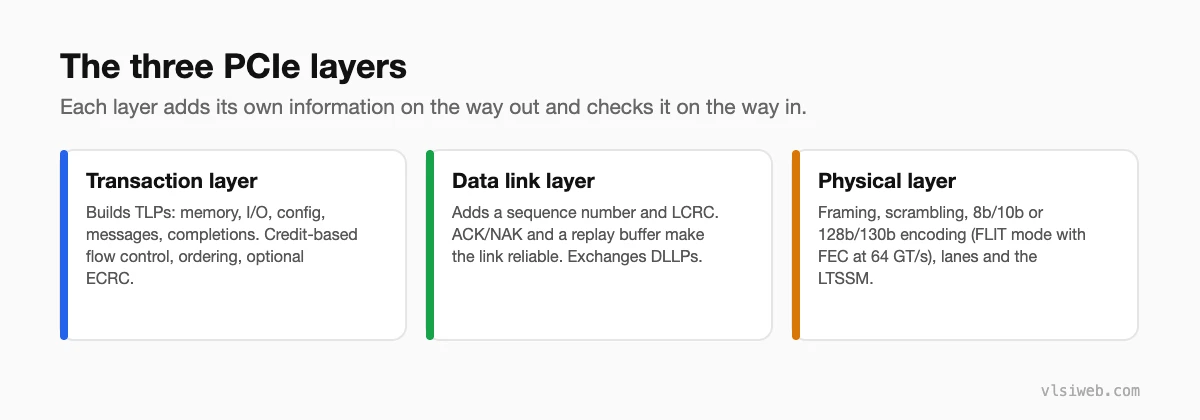
Physical Layer: Handles serialization, clock recovery, lane training, speed negotiation, and link equalization. Concerns: signal integrity, CDR (clock/data recovery), receiver equalization.

Data Link Layer: Packages TLPs (Transaction Layer Packets) into DLLPs (Data Link Layer Packets), adds CRC, implements ACK/NAK retry, manages flow control credits. Concerns: reliable packet delivery, error correction.

Transaction Layer: Defines TLP format (read, write, message, completion), address routing, requester ID, and completion semantics. Concerns: end-to-end transaction semantics, address translation, access rights.

Errors at the physical layer (bit flips, loss of signal) are caught by LCRC (Link CRC) and trigger retries. Errors at the transaction layer (bad address, access denied) result in Completion packets with error status.

Q12. What is a TLP? List TLP types (MRd, MWr, CplD, Msg, etc.) with 4-byte header format.

A TLP (Transaction Layer Packet) is the fundamental PCIe message. There are several types:

TLP Type Code Purpose
Memory Read MRd Read from memory address
Memory Write MWr Write to memory address
Completion Cpl / CplD Response to MRd / CplD w/ data
IO Read IORd Read from IO space
IO Write IOWr Write to IO space
Message Msg Interrupt, PM, hotplug, etc.
Config Read CfgRd0/Rd1 Read config register
Config Write CfgWr0/Wr1 Write config register

Q13. TLP header format — explain Type, Length, Address fields. Show ASCII layout.

A PCIe TLP has a 4-DW (double-word, 128-bit) header plus payload. The header includes:

DW0: [R] [Fmt (2b)] [Type (5b)] [TC (3b)] [R] [TLP Digest (1b)]
     [Poisoned] [Tag (10b)] [Requester ID (16b)]

DW1: [Address (32b)] — for 32-bit, or high 32 of 64-bit

DW2: [Address (32b)] — for 64-bit addressing
     [Tag (8b)] [Byte enables (4b)]

DW3: [Data (32b)] or [Completion status] — if applicable

Key fields:
- Type (5b): Identifies TLP type (MRd=00000, MWr=01000, Cpl=01010, etc.)
- Fmt (2b): Format (00=3DW no data, 01=4DW no data, 10=3DW w/data, 11=4DW w/data)
- Length (10b): Number of DWs in payload (not header)
- Tag (10b): Unique ID for this transaction (used to match Completions to Requests)
- Requester ID: BusNumber:DeviceNumber:FunctionNumber

Q14. What is a DLLP? How does it differ from a TLP?

A DLLP (Data Link Layer Packet) is a data link layer control message. It’s much smaller than a TLP (only one 4-byte DW) and contains no payload. DLLPs include ACK, NAK, and PM_Enter_L1 (power management).

The key difference: TLPs are generated by the transaction layer and can travel end-to-end across switches. DLLPs are generated and consumed at the data link layer and never leave the current link. For example, when a receiver gets a TLP, the data link layer sends back an ACK DLLP to say “I got it.” If the TLP had an error, it sends NAK.

Q15. ACK/NAK retry mechanism — what triggers a NAK? What is the retry buffer?

When the receiver’s data link layer detects an error in a TLP (bad LCRC), it sends a NAK DLLP. The transmitter, upon receiving NAK, must retransmit all TLPs since the last ACK. To enable this, the transmitter keeps a retry buffer (a queue) of all transmitted TLPs until they are ACKed.

The retry buffer is finite — if it fills up, the transmitter stalls until space is freed (by ACKs arriving). This limits the amount of data in flight. Good endpoint design keeps track of retry buffer depth to avoid deadlock.

Q16. Flow control credits — Posted/Non-Posted/Completion credit types, credit return mechanism

PCIe uses credit-based flow control to prevent a transmitter from flooding a receiver. There are three credit types, corresponding to three types of TLP buffers in the receiver:

Posted Credits: For MWr (memory write) TLPs. Once the receiver posts the write (doesn’t require a completion), it frees the buffer, allowing more writes.

Non-Posted Credits: For MRd, IORd, and CfgRd TLPs. The receiver must hold these until a Completion comes back. Typically, small number of non-posted credits (limiting in-flight reads).

Completion Credits: For Cpl/CplD TLPs. When the receiver sends a completion, it consumes one of the requester’s completion credits. The requester returns credits by consuming the completion.

Before sending a TLP, the transmitter must have at least one credit of that type. The receiver periodically sends UpdateFC DLLPs advertising how many new credits it has available.

💡 Tip: Flow control deadlocks are subtle. For example, if a device sends many non-posted reads but the receiver’s non-posted credit buffer fills up, the transmitter stalls. But the receiver needs to send a completion to free buffer space — creating a deadlock. Always design endpoints to ensure completions flow back promptly.

Q17. What is the credit update mechanism? How does flow control prevent deadlock?

The receiver monitors its buffer usage and sends UpdateFC DLLPs whenever buffer space becomes available. The transmitter, upon receiving UpdateFC, increments its local credit counter, allowing it to send more TLPs.

To prevent deadlock, PCIe specifies a “credit return latency” — the receiver must not starve the transmitter indefinitely. Also, the receiver must prioritize sending completions (which consume credits from the other side) to prevent mutual blocking.

Q18. What is ECRC vs LCRC? Where is each added?

LCRC (Link CRC) is calculated over the entire TLP (header + payload) and is added by the transmitter’s data link layer at the end of each TLP. The receiver checks LCRC; if it fails, a NAK is sent. LCRC protects against bit errors on the link.

ECRC (End-to-End CRC) is optional and covers the TLP payload and some header fields (not the LCRC or ECRC itself). It’s calculated by the requester and verified by the completer, protecting against corruption across multiple links (through switches). ECRC is enabled via config space and is useful in systems with many switches where errors might not be caught by LCRC.

Q19. AER (Advanced Error Reporting) — correctable vs uncorrectable errors

AER is a PCIe feature that categorizes errors and allows better error reporting to software. Correctable errors (like single-bit flips caught by ECRC) are logged but don’t stop operation. Uncorrectable errors (like bad address, poisoned data, ECRC failure) are fatal — the link goes down and recovery is needed.

The Root Complex and switches implement AER logic to track errors per device. Software can query AER registers to understand which device had issues and take corrective action (e.g., reset the device, failover to another).

Q20. What is an End-to-End TLP prefix? What is an FLIT? (Gen6)

PCIe Gen5 introduced TLP Prefix — an optional additional header before the main TLP header. Prefixes carry additional information like Power Gating ID or Physical Layer Packet (PLP) status.

Gen6 introduced FLIT (Flow Control Unit), a term borrowed from other protocols meaning “smallest atomic unit.” A FLIT is 256-bit wide in Gen6, compared to 128-bit in earlier generations, improving bandwidth efficiency.

Section 3: Config, Enumeration & Power

Q21. PCIe configuration space — Type 0 vs Type 1 header, what do BARs tell the OS?

Every PCIe device has a 4 KB configuration space accessed via CfgRd/CfgWr TLPs. The first 64 bytes are standardized.

Type 0 header is used by Endpoints. Type 1 header is used by Switches and Bridges. Key difference: Type 0 has 6 BARs (Base Address Registers) pointing to I/O or memory regions; Type 1 has bridge control fields (subordinate bus number, secondary bus number) for routing TLPs downstream.

BARs (Base Address Registers): Each BAR is a 32 or 64-bit pointer to a region of memory or I/O space that the device owns. The OS uses BARs to allocate physical address ranges to each device. For example, a network card might have BAR0 pointing to a 64 KB memory region containing the NIC’s registers and ring buffers.

The OS discovers BARs by writing 0xFFFFFFFF to each BAR register and reading back the value — the hardware masks off the implemented bits, revealing the size of the addressable region. From this, the OS allocates address space and writes back the real base address.

Q22. How does the OS enumerate the PCIe hierarchy at boot?

PCIe enumeration is a software process (driver/firmware) that happens at boot:

1. OS starts at Root Complex (Bus 0)
2. For each device found:
   - Read Vendor ID, Device ID from CfgRd
   - If it's a Switch/Bridge: assign secondary bus number
     and recursively enumerate downstream
3. Allocate address space to each device's BARs
4. Load drivers based on Vendor ID / Device ID

This creates a tree of Bus:Device:Function numbers. Once enumeration is complete, the OS can route TLPs to any device via its BDF (Bus Device Function) address.

Q23. MSI vs MSI-X vs INTx — differences and how each delivers interrupts

PCIe devices signal interrupts to the CPU using one of three mechanisms:

Mechanism Method Pros/Cons
INTx (A/B/C/D) Shared wired pins (legacy) Simple, but only 4 IRQs; shared with other devices → polling
MSI Device writes to memory address Up to 32 separate IRQ vectors; not shared → no polling
MSI-X Device writes to table of memory addresses Up to 2048 IRQ vectors; fine-grained control; modern standard

MSI and MSI-X work by having the device execute a write transaction to a specific address. The CPU’s PCIe root complex (IOMMU) intercepts this write and generates an interrupt. Modern server and desktop systems use MSI-X almost exclusively.

Q24. PCIe power states — L0/L0s/L1/L2/L3 — latency and recovery for each.

PCIe defines link power states to reduce power consumption during idle periods:

State Power Recovery Latency Use Case
L0 Full power, active — Normal operation
L0s Low-power (clock gating) < 1 μs Brief idle (ASPM)
L1 Very low (PLL off) 1–2 ms Longer idle
L2 Aux power only (aux supply) 100 ms+ Standby / sleep
L3 Off (hot-remove capable) Full re-enumeration Device not present

Q25. What is ASPM (Active State Power Management)?

ASPM is a protocol feature where the link automatically enters L0s or L1 during idle periods without software intervention. Both sides must agree to enter a low-power state via negotiation during link training. Once enabled, the link hardware autonomously detects idle time and transitions to save power.

ASPM is crucial for battery life in laptops — without it, PCIe links are always active, draining power. However, exiting from L1 can introduce latency, so ASPM is tuned per platform to balance power and responsiveness.

Q26. What is D0/D1/D2/D3hot/D3cold device power state?

These are device-level power states (not link states). They’re defined in the device’s power management config register and represent how much power the device is consuming.

D0: Fully powered, fully operational. D1/D2: Intermediate states with reduced power (context saved). D3hot: Low power, context lost, but device can still respond to config cycles. D3cold: Device powered off, no context, removed from link.

The OS uses these to manage device power across the system. A USB device in an idle port might go to D3cold to save power; when accessed, the OS wakes it back to D0.

Q27. SR-IOV — what is it and how does it create virtual functions?

SR-IOV (Single-Root I/O Virtualization) is a PCIe mechanism that allows a single physical device (function) to present itself as multiple virtual functions to the system. Each virtual function has its own BARs, interrupt vectors, and configuration space, allowing hypervisors to assign different virtual functions to different VMs.

For example, a single 10 GbE NIC might create 4 virtual functions, allowing a hypervisor to dedicate each to a different VM. Each VM sees a separate NIC endpoint and can manage it independently. The physical function (PF) is managed by the hypervisor; virtual functions (VFs) are used by VMs.

Q28. What is PCIe peer-to-peer DMA? What are the challenges?

Peer-to-peer (P2P) DMA allows one device to DMA directly to another device’s memory without going through the CPU. For example, a GPU might DMA data directly from a network card’s buffer to the GPU’s local memory.

Challenges: (1) Not all systems support P2P — some root complexes don’t permit TLPs to route peer-to-peer. (2) Address translation: the IOMMU might interpret the peer’s address differently than expected. (3) Coherency: if the CPU has cached data from the peer, the GPU’s DMA might miss the updated values. Modern systems use ATS (Address Translation Services) and PRI (Page Request Interface) to handle this, but it’s complex.

Q29. PCIe memory-mapped I/O vs I/O space BAR — when is each used?

BARs can point to either memory space (type 0) or I/O space (type 1). Memory-mapped I/O (MMIO) uses a BAR in the system’s main memory address map, allowing CPU and DMAs to access device registers with normal load/store instructions. I/O space BARs are a legacy holdover from parallel PCI and require special x86 IN/OUT instructions to access — rarely used in modern designs.

Modern designs almost always use MMIO. I/O space is kept for compatibility with old drivers and hardware.

Q30. PCIe requester ID (Bus:Device:Function) and routing

Every TLP includes a Requester ID (RID) — the address of the originating device. The Requester ID is Bus number (8b), Device number (5b), Function number (3b). Switches and the root complex use the RID to route completion packets back to the requester.

For example, a GPU at Bus 1, Device 0, Function 0 requests a memory read. The TLP includes RID=1:0:0. A switch receiving this TLP checks the address; if it’s out the upstream port, the switch forwards it. The root complex or target device sends a completion TLP with RID=1:0:0, and the switch routes it back downstream to Bus 1, Device 0, Function 0.

Section 4: Advanced PCIe

Q31. PCIe Gen4/Gen5 differences from Gen3 (equalization, PAM4 consideration)

Gen3 (8 GT/s) requires aggressive receiver equalization but still uses 8b/10b encoding. Gen4 (16 GT/s) pushes equalization further and switches to 128b/130b to reduce overhead. Gen5 (32 GT/s) is essentially Gen4 at 2x speed with even tighter margins.

Gen6 (64 GT/s) contemplates PAM4 (4-level modulation) to reach higher speeds without proportionally increasing frequency. PAM4 is much more sensitive to noise and ISI (intersymbol interference), requiring sophisticated receiver equalization and decision feedback.

Q32. What is CXL (Compute Express Link)? How does it build on PCIe?

CXL is a new interconnect standard (1.0, 2.0, 3.0) built on the PCIe physical layer (compatible lanes and speeds) but adds new protocols for coherent memory access. A CXL device can expose its own memory to the CPU, and the CPU can cache that memory coherently. This enables disaggregated memory pooling — multiple CPUs can share a pool of memory over CXL.

Versions: CXL 1.0 was proof-of-concept. CXL 2.0 added “Type 3” for memory expansion (exposes gigabytes of memory over CXL). CXL 3.0 adds CXL-over-Ethernet for rack-scale memory pooling. CXL is the future of data center interconnects, alongside PCIe.

Q33. PCIe SERDES design requirements — what does the PHY have to do?

The PCIe PHY must: (1) serialize parallel data into serial bitstream, (2) implement clock recovery (CDR — clock/data recovery) to extract timing from the incoming signal, (3) perform receiver equalization to compensate for channel distortion, (4) implement link training protocols (TS1/TS2 ordered sets), and (5) detect and respond to electrical idle.

At Gen3+, the PHY also implements feedback-based equalization where receiver equalization coefficients are adjusted during training to optimize the eye diagram. This is complex analog and mixed-signal design.

Q34. PCIe compliance testing — what tests does a PCIe device need to pass?

PCIe devices must pass extensive compliance tests defined by the PCI-SIG organization. Tests include: link training (correct speed/width negotiation), TLP generation/reception (correct formats), flow control (no deadlock), error handling (NAK/ACK, ECRC), power management (L0s/L1 transitions), and hot-plug. SERDES compliance tests cover eye diagram, jitter, insertion loss, etc.

Compliance testing is non-negotiable for tape-out. Major datacenters require proof of successful compliance before accepting silicon.

Q35. PCIe verification strategy — what layers need to be verified?

PCIe verification spans three layers: (1) Physical layer (CDR, equalization, eye quality via simulation or silicon), (2) Protocol layer (TLP generation, flow control, error handling via UVM/testbenches), and (3) System integration (full datapath, multiple devices, interop with existing switches/endpoints).

Most design teams use VIP (Verification IP) from vendors like Synopsys or Cadence that provide PCIe protocol checkers and modelized endpoints. You then write testbenches to exercise your design against these models.

Q36. Common PCIe design bugs (top 5) — with bug and impact.

Bug Cause Impact
Flow control deadlock Endpoint doesn’t send completions promptly Link hangs, system unresponsive
Bad tag handling in completions Endpoint sends completion with wrong tag Data routed to wrong transaction, memory corruption
Improper LTSSM handling Link training hangs, fails to reach L0 Link never comes up, device unusable
Retry buffer overflow Transmitter retry buffer fills, can’t send new TLPs Transmitter stall, degraded throughput
MSI payload corruption Endpoint writes wrong data to MSI address Interrupts routed to wrong handler, system hangs

Q37. DMA engine design for PCIe — scatter-gather list, descriptor ring

A DMA engine for PCIe typically uses a descriptor ring in system memory. The device firmware (or host driver) sets up descriptors pointing to source/destination buffers. The DMA engine reads descriptors, issues MRd TLPs to read source data, issues MWr TLPs to write to destination, and advances the descriptor pointer. Scatter-gather allows non-contiguous memory regions to be DMAed sequentially — each descriptor specifies a fragment.

Correctness requires proper flow control (not getting too far ahead), tag management (not exceeding non-posted credit), and error handling (ECRC failures, poisoned completions).

Q38. PCIe in data center — CXL memory pooling, disaggregated memory

Modern data centers are moving toward disaggregated memory — instead of each server having fixed DDR capacity, memory pools are shared over fast interconnects (CXL). A compute pod can dynamically acquire memory from a shared pool, improving utilization. This requires: (1) PCIe/CXL fabric, (2) coherency protocols (CXL semantics), and (3) IOMMU remapping to make pooled memory appear local to the compute pod.

This is a radical departure from traditional server architecture and is expected to dominate future data centers.

Q39. PCIe switch — how does it route TLPs? (upstream/downstream port)

A PCIe switch is a bridge with multiple ports: one upstream (toward root) and many downstream (toward endpoints). When a switch receives a TLP on one port, it checks the TLP’s destination address (or Requester ID for completions). If the address is in the downstream region (from Secondary Bus Number in the bridge’s config), the switch forwards to the appropriate downstream port. If upstream, it forwards upstream.

Switches add latency and complexity but allow many devices to share a single root complex port. Most data center fabrics use switches extensively.

Q40. PCIe power management in mobile/laptops — Runtime PM, D3cold

Mobile devices aggressively manage PCIe power to extend battery life. When a PCIe device (like a USB-attached storage) is idle, the OS moves it to D3cold, completely cutting power except for an auxiliary supply pin. When the device is accessed, the OS powers it back on and initiates link re-training.

The challenge: re-training the link and recovering data structures takes time and power. The OS must balance the latency cost against power saved. Some devices implement “runtime PM” — a software-coordinated idle timeout where the device auto-transitions to D3cold after N seconds of inactivity, with minimal OS intervention.

Interview Cheatsheet: PCIe by Company

Company Most-Asked Topics Why
Intel LTSSM (Q5), Link equalization (Q7), Gen4/Gen5 (Q31) Intel owns PCIe IP; high-speed equalization is critical
Nvidia Flow control (Q16–Q17), DMA engine design (Q37), topology (Q6) GPUs are high-throughput PCIe endpoints; flow control deadlocks kill perf
Qualcomm Mobile PCIe (Q40), power states (Q24–Q25), MSI-X (Q23) Qualcomm SoCs use PCIe for modems, storage; mobile power mgmt critical
AMD Switches (Q39), multi-hierarchy (Q6), compliance (Q34) AMD designs high-end consumer CPUs with complex PCIe fabrics
Broadcom (Switches) Routing (Q39), TLPs (Q12–Q13), error handling (Q19) Broadcom dominates PCIe switch/fabric market; deep protocol knowledge needed
CXL/Memory (startups) CXL (Q32), disaggregated memory (Q38), coherency CXL is the new frontier; understanding memory coherency over interconnect is key

Key Resources

  • PCI Express Specification (5.0 / 6.0) — The official spec; available from PCI-SIG (membership required)
  • PCIe PHY & Protocol Training (Cadence / Synopsys) — Online courses covering link training and equalization
  • CXL Specification — Available from CXL Consortium; essential for memory-pool designs
  • Xilinx / Intel PCIe IP User Guides — Practical examples of PCIe controllers and verification
  • Your company’s PCIe design guidelines — Most large companies have internal PCIe playbooks
  • PCIe Compliance Test Suite — If your company has a lab, review actual test cases

📌 Final Note: PCIe is a massive specification (600+ pages), and no one memorizes all of it. Interviewers ask these questions to gauge your intuition about link training, flow control, and error handling — the things that cause real bugs in silicon. Focus on understanding the “why” behind design decisions (e.g., why did Gen4 switch to 128b/130b?), not memorizing every field. You’ll do great.

Share. Facebook Twitter LinkedIn Email Telegram WhatsApp
Previous ArticleMealy State Machine – Digital Circuits
Next Article Ethernet Protocol Interview Questions for VLSI Interviews
Raju Gorla
  • Website

Related Posts

Interview Questions

DFT Interview Questions and Answers for VLSI Engineers

19 March 2026
Interview Questions

STA Interview Questions: 52 Real-World Questions with Answers (2026)

18 March 2026
Interview Questions

TCL Interview Questions for VLSI Engineers

6 November 2024
Add A Comment
Leave A Reply Cancel Reply

Topics
  • Design Verification
  • Digital Circuits
  • Informative
  • Interview Questions
  • Physical Design
  • RTL Design
  • STA
  • System Verilog
  • UVM
  • Verilog
Instagram LinkedIn WhatsApp Telegram
© 2026 VLSI Web

Type above and press Enter to search. Press Esc to cancel.