


The short answer: A Verilog module is a block of hardware with a name, a list of ports (input, output, inout) and a body. You build bigger designs by instantiating modules inside other modules and connecting their ports with wires, which creates a hierarchy. Use ANSI-style port declarations, connect ports by name (.port(signal)) rather than by position, and use parameters to make modules reusable.
Every Verilog design is built from modules, from a single flip-flop up to a full SoC. This post covers defining a module, declaring its ports, instantiating it and building a hierarchy. It replaces four older posts on module definitions, port declarations, instantiation and hierarchical design.
- Defining a module
- Ports
- Instantiating modules
- Hierarchy and hierarchical names
- Generate: many instances at once
- How I structure modules
Table of Contents
Part 1: Defining a module
`default_nettype none

module adder #(
  parameter W = 8                 // width, can be overridden
) (
  input  wire [W-1:0] a,
  input  wire [W-1:0] b,
  output wire [W:0]   sum         // one extra bit for the carry
);
  assign sum = a + b;
endmodule
This is the ANSI style from Verilog-2001: direction, type and width all in the port list. The older style lists port names first and declares them again in the body; you’ll still see it in old code, but there’s no reason to write it today.
Part 2: Ports
| Direction | Meaning | Inside the module |
|---|---|---|
| input | Driven from outside | Always a net (wire) |
| output | Driven from inside | wire if assigned with assign, reg if assigned in always |
| inout | Bidirectional | A net, usually driven with a tri-state: assign pad = oe ? d : 1’bz; |
Bidirectional ports are mostly used at chip I/O pads. Inside a chip, use separate input and output signals; internal tri-states are avoided in modern designs.
Part 3: Instantiating modules
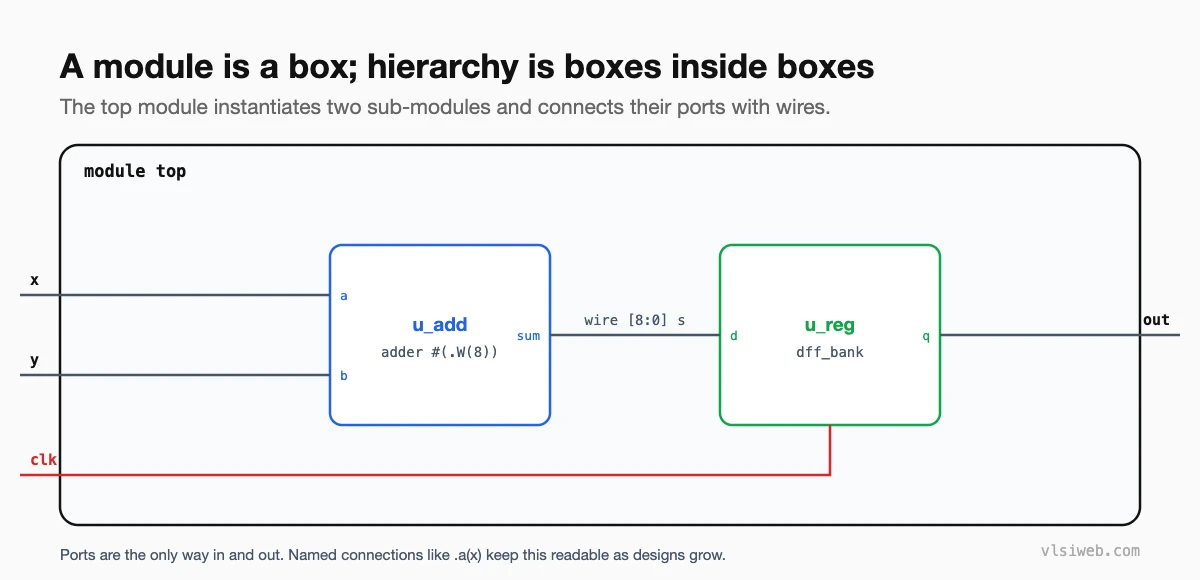
module top (
  input  wire       clk,
  input  wire [7:0] x, y,
  output wire [8:0] out
);
  wire [8:0] s;

  adder #(.W(8)) u_add (      // parameter override, instance name
    .a   (x),
    .b   (y),
    .sum (s)
  );

  dff_bank #(.W(9)) u_reg (
    .clk (clk),
    .d   (s),
    .q   (out)
  );
endmodule- Connect by name (
.a(x)), not by position (adder u_add (x, y, s);). Positional connections break silently when someone reorders ports. - Give every instance a meaningful name. I use a
u_prefix; it appears in every hierarchical path, waveform and timing report. - Unconnected ports: leave an output empty with
.carry(). Never leave inputs floating; tie them to a constant. - Width mismatches between a port and its signal are only warnings in Verilog. Read them; they’re often real bugs.
Part 4: Hierarchy and hierarchical names
Instantiating modules inside modules creates a tree. Every signal has a hierarchical path, such as top.u_add.sum. Testbenches and waveform viewers use these paths, and so do timing and synthesis reports.
You can read a signal deep in the hierarchy from a testbench with its full path ($display("%h", tb.dut.u_add.sum);). That’s fine for debugging, but don’t use hierarchical references in synthesisable RTL; connect through ports instead.
Part 5: Generate: many instances at once
genvar i;
generate
  for (i = 0; i < 4; i = i + 1) begin : g_lane
    adder #(.W(8)) u_add (
      .a   (a[8*i +: 8]),
      .b   (b[8*i +: 8]),
      .sum (sum[9*i +: 9])
    );
  end
endgenerate
Name the generate block (g_lane) so instances get readable paths like g_lane[2].u_add.
Part 6: How I structure modules
- One module per file, with the file named after the module.
- Parameters for anything that might change: widths, depths, counts.
- Inputs and outputs grouped by interface (clock and reset first, then each bus).
- Register outputs of a block where possible; it makes timing between blocks much easier.
- A short comment at the top: what the block does and any assumptions about its inputs.
Practise this on VLSI Forge
I built VLSI Forge so you can write RTL in your browser, run it on a real simulator and check every signal in the waveform. Free, nothing to install.
Previous in my Verilog series: Verilog operators. Next: Levels of modelling in Verilog.
FAQ
What is the difference between a module and an instance?
A module is the definition, like a class. An instance is one copy of it placed in a design, with its own name and connections.
Can an output port be a reg?
Yes. Declare it as output reg if you assign it in an always block. In SystemVerilog, use output logic.
What happens if I leave an input unconnected?
It floats at z in simulation and can cause x propagation. Synthesis tools may tie it off, but you should always connect inputs explicitly.
Should I connect ports by name or by position?
By name. It’s self-documenting and doesn’t break when the port order changes.
