

The short answer: if you want a VLSI job, you need strong digital fundamentals, clean Verilog or SystemVerilog, the core skills of one role (design, verification, physical design, STA or DFT), and enough Python, Tcl and Linux to automate your own work. These days I’d add one more: knowing how to check what an AI tool gives you. Everything else is a bonus.
I get asked “what should I learn for VLSI?” more than any other question. And I understand why. Search for it and you’ll find lists of twenty tools, ten languages and every buzzword in the industry. That’s not how hiring works. Interviewers rarely care how many things you’ve touched. They care whether you really understand a few things and can learn the rest.
So in this guide I’ll tell you what I think actually matters, in the order I’d learn it if I were starting today. It’s split into six parts:
- Pick your lane
- Build the skill stack, bottom up
- What’s changed in the last couple of years
- What I’d stop worrying about
- How to prove your skills
- My 90-day plan
Table of Contents
Part 1: Pick your lane
The first mistake I see is people trying to learn “VLSI” as one subject. It isn’t. A chip goes through many stages before it’s made, and each stage has its own engineers with very different day jobs.
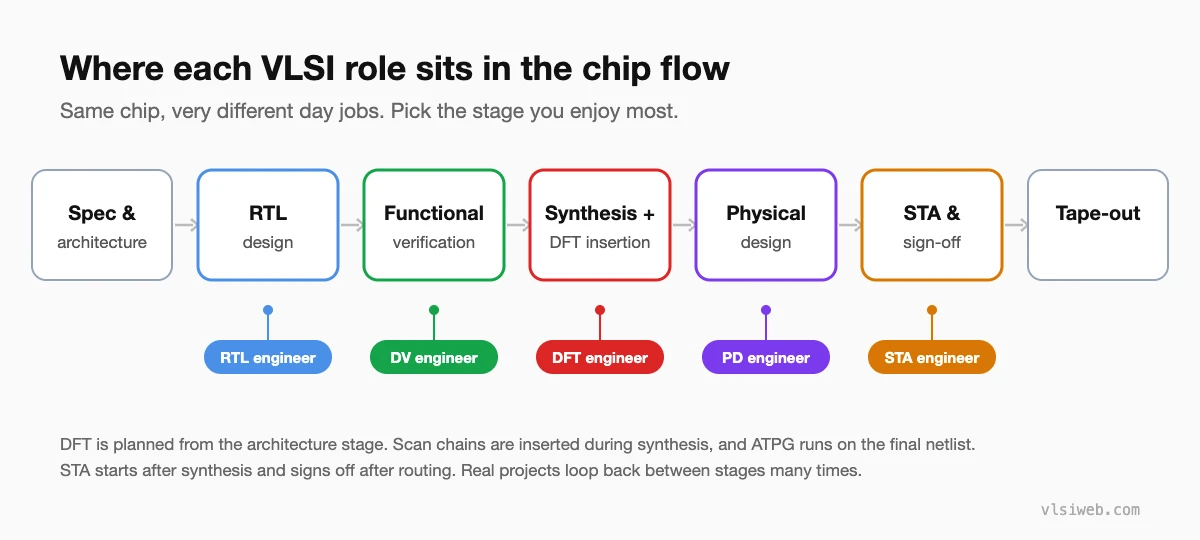
Here’s how I’d describe each one to a friend:
| Role | What you actually do | Skills you can’t skip |
|---|---|---|
| RTL design | Write and review the logic that becomes the chip | Verilog/SystemVerilog, FSMs, pipelines, CDC, synthesis basics |
| Design verification (DV) | Prove the design matches the spec, and hunt for bugs | SystemVerilog, UVM, assertions (SVA), coverage, waveform debug |
| DFT | Build test logic (scan chains, MBIST, compression) into the design so every chip can be tested after manufacturing | Scan insertion, ATPG, fault models, MBIST, JTAG |
| Physical design (PD) | Turn the netlist into a layout that meets timing and power | Floorplan, placement, CTS, routing, congestion, Tcl |
| STA | Make sure every path meets timing in every corner, from synthesis through to sign-off | Setup/hold, SDC constraints, OCV, multi-corner analysis |
My advice: pick one and go deep. You can switch later; plenty of good engineers have. If you really can’t decide, start with RTL design or verification. You can simulate everything on a laptop, so you get feedback in seconds and learn much faster.
Part 2: Build the skill stack, bottom up
I think of VLSI skills as a stack. Each layer rests on the one below it. When someone struggles in an interview, the problem is almost always at the bottom, not the top.
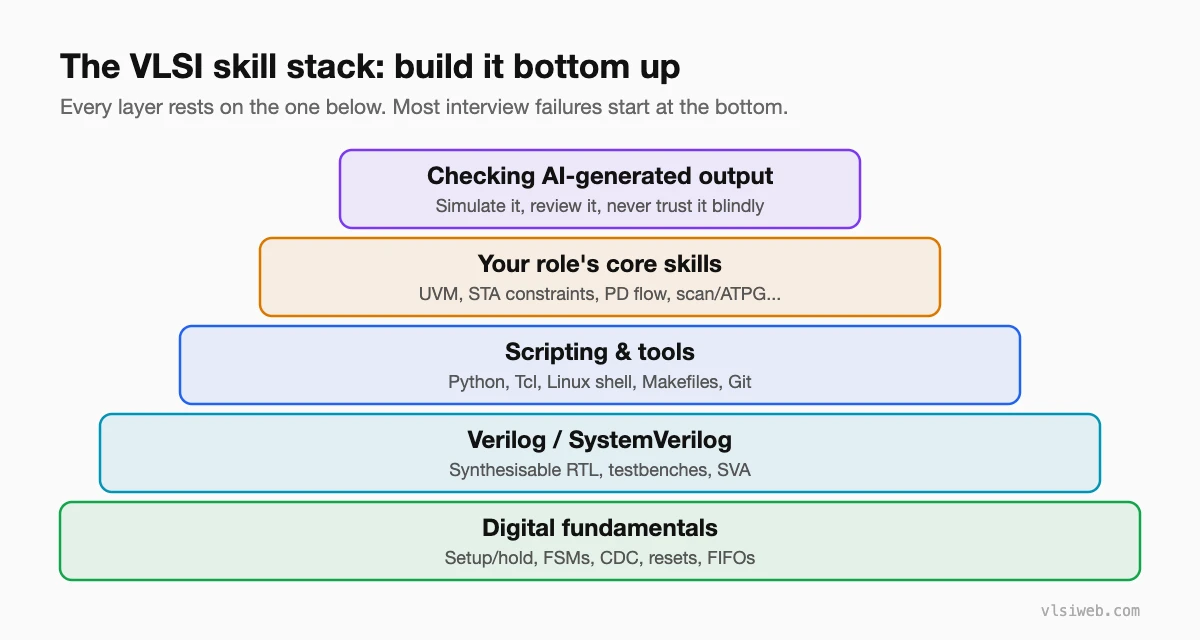
Layer 1: Digital fundamentals
This is still the first filter in almost every interview. Before anything else, make sure you can explain these without notes:
- Setup and hold time, and what really happens when either is violated
- Why one flip-flop isn’t enough to cross clock domains, and what a two-flop synchroniser fixes (and what it doesn’t)
- Mealy vs Moore machines, and when you’d choose each
- Synchronous vs asynchronous reset, and the trade-offs
- How a FIFO knows it’s full or empty
None of this is new, and that’s exactly my point. Tools change every few years. Fundamentals don’t.
Layer 2: Verilog and SystemVerilog you can trust
Writing code that simulates is easy. Writing code that turns into the hardware you meant is the real skill. These are the things I’d make sure you’re solid on:
- Blocking vs non-blocking assignments, and why mixing them causes races
- How a missing
elseordefaultquietly creates a latch - Parameterised modules and
generateblocks - For verification: classes, randomisation, constraints, interfaces and SVA
You won’t get good at this by reading. Write small designs, run them, break them, and look at the waveform until you understand why they broke.
Layer 3: Scripting and tools
Honestly, this is the skill freshers underrate the most. Real projects mean thousands of log files, regressions running overnight, and reports nobody wants to read by hand. The person who writes a 30-line Python script to find the five failing tests out of 2,000 is the person the team remembers.
- Python for parsing logs, generating test vectors and quick analysis
- Tcl, because nearly every EDA tool for synthesis, PD and STA is driven by it
- Linux shell, Makefiles and Git, because that’s where all of this runs
Layer 4: Your role’s core skills
This is where your lane from Part 1 comes in. For DV it’s UVM and coverage. For STA it’s writing and debugging constraints. For PD it’s the full flow from floorplan to sign-off. Pick the column from the table above and work through it properly.
One habit I’d build early, whatever your role: get comfortable reading output, not just writing input. Can you look at a timing report and say which path failed and why? Can you trace a wrong value in a waveform back to the line of code that caused it? That’s most of what you’ll do in your first year.
Layer 5: Checking AI-generated output
This layer is new, and I’ll explain it in the next part.
Part 3: What’s changed in the last couple of years
AI tools are part of the flow now
The big EDA vendors now ship AI-driven features. Synopsys has its Synopsys.ai suite, and Cadence has Cerebrus and its JedAI platform. Lots of engineers also use general coding assistants to draft RTL, testbenches and scripts.
I don’t think this makes engineers less needed. It changes which skill is valuable. Anyone can ask an assistant for a FIFO. The engineer who notices that its full flag is off by one, or that it quietly inferred a latch, is the one you want on your team. So yes, use AI tools while you learn. Just treat what they give you like code from a new intern: helpful and fast, but never trusted until you’ve simulated it yourself.
Chiplets and advanced packaging
More big chips are now built from several smaller dies in one package, connected by die-to-die links such as UCIe. If you’re aiming for architecture, PD or verification at a large company, learn the basic ideas: die-to-die interfaces, how timing and test work across dies, and why packaging has become a design problem and not only a manufacturing one.
Low power shows up everywhere
Phones, data centres and AI accelerators all fight for every milliwatt. Clock gating, power domains, isolation, retention and UPF used to be specialist topics. Now I’d expect them to come up even in general RTL and verification interviews.
RISC-V and open-source tools
RISC-V has made processor design far more open. You can build a working CPU yourself and run real programs on it, and I can’t think of a better project to talk about in an interview. Open-source tools like Verilator, cocotb and OpenROAD also mean you can learn a real flow without a commercial licence.
Part 4: What I’d stop worrying about
- Long lists of tool names. “Knows Cadence, Synopsys and Siemens tools” tells an interviewer almost nothing. “Closed timing on a block” or “wrote a UVM agent for AXI” tells them a lot. Companies will teach you their tools.
- Collecting certificates. From what I’ve seen, a certificate rarely gets anyone an interview. A project you can explain for 20 minutes often does.
- Knowing a bit of everything. Depth in one role beats a shallow tour of all five, every time.
Part 5: How to prove your skills
Interviewers believe what they can see. Here’s what I’d focus on:
- One or two real projects. A UART, an AXI-Lite slave with a proper testbench, or a small pipelined CPU. Put the code on GitHub with a short README that explains your design choices.
- Interview-style problems, until they’re boring. You should be able to write a synchronous FIFO, an FSM or a clock divider without looking anything up.
- Explain your trade-offs out loud. A sentence like “I used an asynchronous FIFO here because the two clocks are unrelated” is exactly what interviewers are listening for.
Practise this on VLSI Forge
I built VLSI Forge for exactly this. Write RTL in your browser, run it on a real simulator, and see every signal in the waveform. Free, nothing to install.
RTL Design problems · Design Verification problems · CDC & RDC problems · Build a RISC-V CPU
Part 6: My 90-day plan
If I had to get job-ready from scratch, this is roughly how I’d spend three months. An hour or two a day is enough. Showing up every day matters more than long weekend sessions.
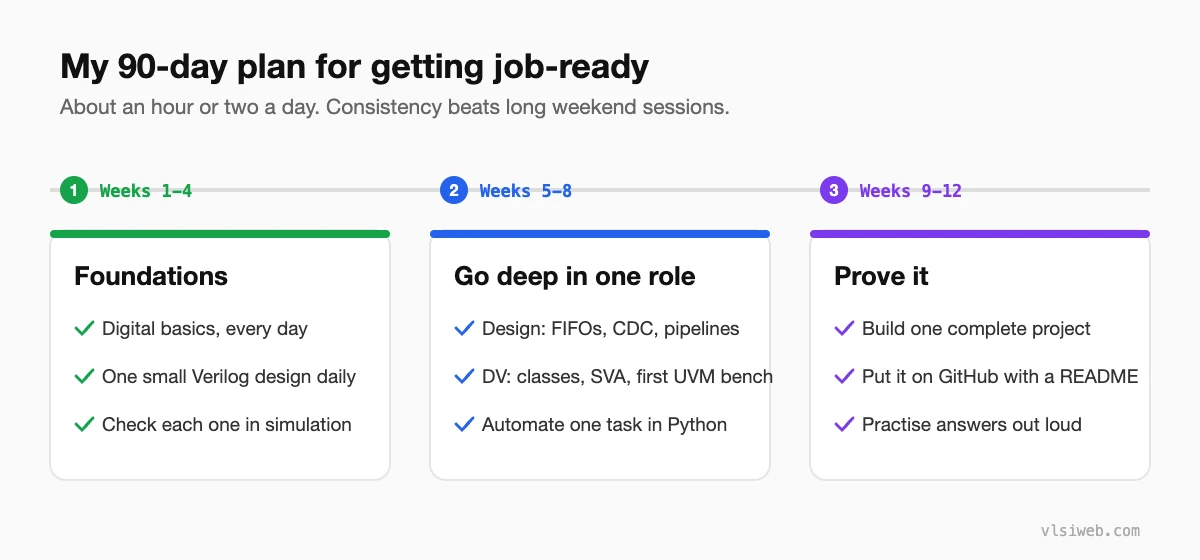
- Weeks 1–4, foundations: digital basics and Verilog. Write one small design every day (a counter, a mux, a shift register, an FSM) and check each one in simulation.
- Weeks 5–8, go deep: for design, FIFOs, CDC and pipelines. For verification, SystemVerilog classes, SVA and your first UVM testbench. Learn enough Python to automate one boring task.
- Weeks 9–12, prove it: build one complete project, put it on GitHub, and work through interview questions for your role. Practise explaining your answers out loud. It feels odd at first, but it works.
You don’t need to master everything before you apply. You need to be clearly good at the basics, and clearly able to learn. In my view, that’s what gets people hired.
FAQ
Which VLSI role has the most openings for freshers?
Design verification has usually taken the most freshers, because most projects need more verification engineers than designers. Physical design is also a big employer, especially at service companies. Openings change by year and city, so I’d always check current listings before deciding.
Do I need a master’s degree to get into VLSI?
No. A master’s helps for some design and architecture roles at large product companies, but plenty of engineers get in with a bachelor’s degree and strong projects. What you can show matters more than the degree.
Is Python really necessary for a hardware job?
Yes, in practice. Nobody will hire you as a Python developer, but you’ll use Python or Tcl almost every week to automate runs, parse logs and check results.
Will AI tools replace VLSI engineers?
I don’t think so, not any time soon. AI tools make engineers faster at routine work, but someone still has to understand the design, decide what’s correct and sign off the chip. Engineers who use these tools well, and know when not to trust them, will be in a stronger position.
