

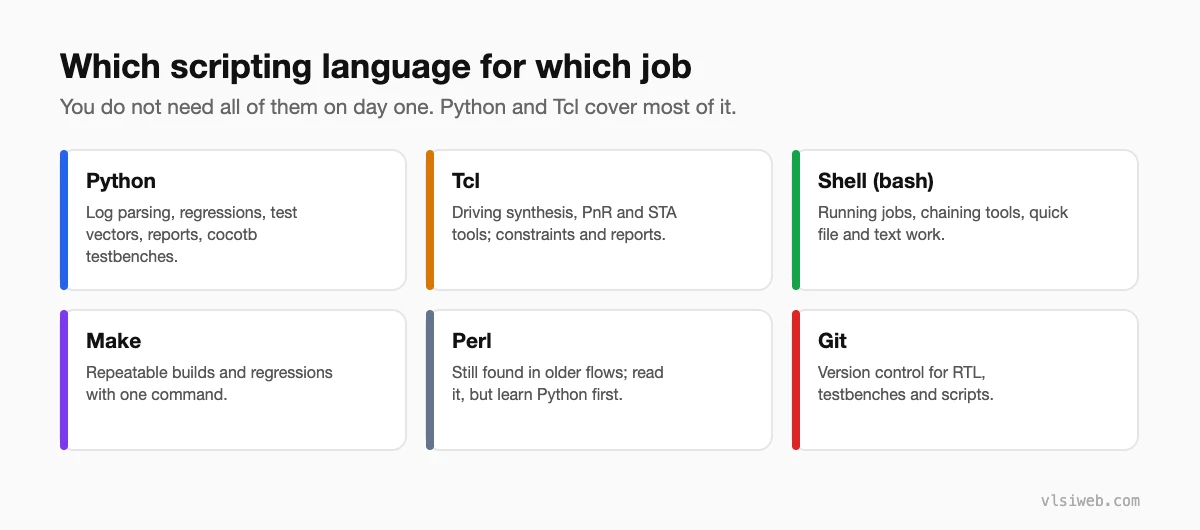
The short answer: every VLSI engineer needs some scripting. Learn Python first for parsing logs, running regressions and generating tests; then Tcl, because synthesis, place-and-route and STA tools are all driven by it; plus enough Linux shell, Make and Git to run your work smoothly. You do not need to be a software engineer, just comfortable automating your own tasks.
Scripting is the skill I see freshers underrate the most. Real chip projects produce thousands of log files, overnight regressions and huge reports. The engineers who can automate the boring parts get more done, make fewer mistakes, and get noticed. Here is what to learn and how I would practise it.
- Which language for which job
- Python: the everyday workhorse
- Tcl: the language of EDA tools
- Shell, Make and Git
- How I would practise
Table of Contents
Part 1: Which language for which job
Part 2: Python: the everyday workhorse
Python is the language I would learn first. It is easy to read and has a library for almost everything. In VLSI it is used for parsing logs, summarising regressions, generating test vectors and register maps, and writing testbenches with cocotb. A tiny example that finds failing tests:
import glob

failed = []
for log in glob.glob("regress/*.log"):
    with open(log) as f:
        if "UVM_ERROR" in f.read():
            failed.append(log)

print(len(failed), "failing tests")
for name in failed:
    print(" ", name)
Part 3: Tcl: the language of EDA tools
Synthesis, place-and-route and STA tools are almost all controlled through Tcl. Constraints (SDC) are Tcl too. You will write scripts to set up runs, apply constraints and pull numbers out of reports. A small example that reports the worst paths:
# Report the 10 worst setup paths and save them
report_timing -max_paths 10 -delay_type max > worst_setup.rpt

# Count violating endpoints
set viol [sizeof_collection [get_timing_paths -slack_lesser_than 0 -max_paths 10000]]
puts "Violating paths: $viol"
Command names vary slightly between tools, but the Tcl itself is the same everywhere.
Part 4: Shell, Make and Git
- Shell (bash): running tools, chaining commands, and quick text work with grep, sed and awk.
- Make: one command to build and run a simulation or regression, the same way every time.
- Git: version control for your RTL, testbenches and scripts. Every company uses it or something like it.
Part 5: How I would practise
- Automate something you already do by hand, like running your testbench and checking the result.
- Write a Python script that reads a simulation log and prints a pass or fail summary.
- Run Yosys or OpenSTA from a Tcl script and pull one number out of the report.
- Put a Makefile in every project so anyone can run it with
make sim.
Practise this on VLSI Forge
I built VLSI Forge so you can write RTL in your browser, run it on a real simulator and check every signal in the waveform. Free, nothing to install.
Practise RTL and verification problems · Debug and analysis problems
FAQ
Do I need to know Perl?
Not to start. Some older company flows still use Perl, so being able to read it helps, but Python has replaced it for most new work.
How much Python do I need for a VLSI job?
Enough to read files, use loops and dictionaries, use regular expressions and write small reusable scripts. You do not need advanced software engineering.
Is Tcl hard to learn?
No. The syntax is a little unusual at first, but you only need the basics: variables, lists, loops, procedures and string handling.
Will AI tools write my scripts for me?
They can help a lot with small scripts. You still need to understand and check them, because a wrong script that silently skips failures is worse than no script.
