

The short answer: A SystemVerilog interface bundles the signals of a bus (and optionally tasks, functions and assertions) into one object, so modules connect with a single port instead of dozens of wires. Modports define the direction of each signal from one side’s point of view (manager, subordinate, monitor). Clocking blocks, usually declared inside interfaces, define when a testbench samples and drives signals relative to a clock, which removes races between testbench and DUT. Testbench classes reach an interface through a virtual interface handle.
Interfaces are the SystemVerilog feature that both design and verification engineers use every day. In RTL they shrink port lists; in testbenches they’re the bridge between the static design and dynamic class-based code. This post combines my older posts on interfaces and modports, hierarchical and configurable interfaces, and clocking blocks.
- The picture
- A complete interface
- Connecting modules
- Clocking blocks
- Virtual interfaces
- Parameterised and nested interfaces
Table of Contents
Part 1: The picture
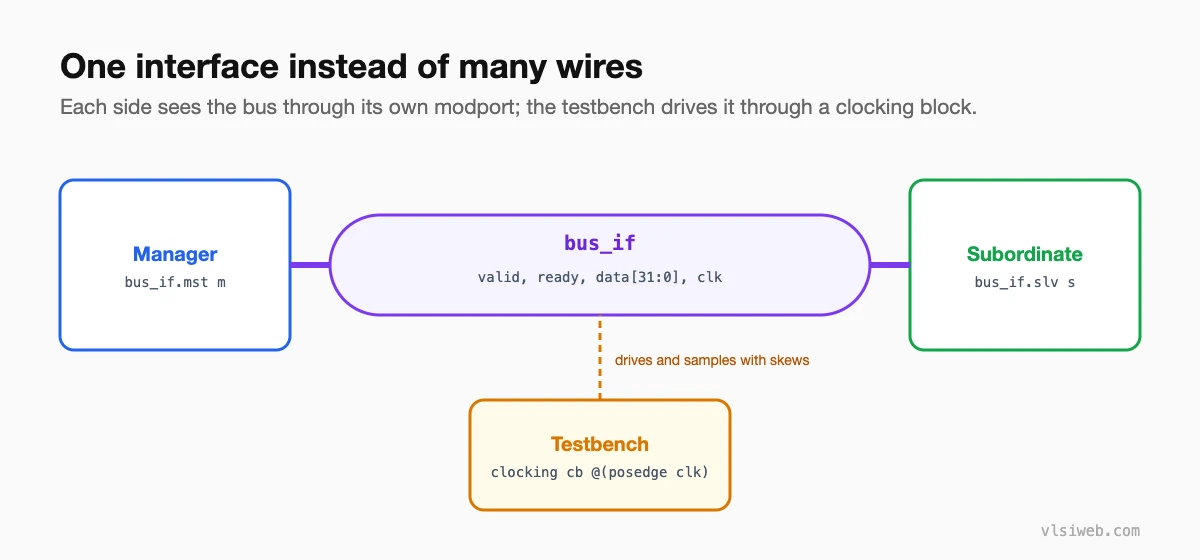
Part 2: A complete interface
interface stream_if #(parameter int W = 32) (input logic clk, input logic rst_n);
  logic         valid;
  logic         ready;
  logic [W-1:0] data;

  modport mst (output valid, data, input  ready, input clk, rst_n);
  modport slv (input  valid, data, output ready, input clk, rst_n);
  modport mon (input  valid, ready, data, clk, rst_n);

  // testbench timing: sample 1 step before the edge, drive 1 ns after
  clocking cb @(posedge clk);
    default input #1step output #1ns;
    output valid, data;
    input  ready;
  endclocking

  // protocol check lives with the bus
  a_hold: assert property (@(posedge clk) disable iff (!rst_n)
            valid && !ready |=> valid && $stable(data));
endinterface
Part 3: Connecting modules
module producer (stream_if.mst bus);
  always_ff @(posedge bus.clk) ...  bus.valid <= 1'b1; ...
endmodule

module top;
  logic clk, rst_n;
  stream_if #(.W(32)) s (.clk, .rst_n);
  producer u_p (.bus(s.mst));
  consumer u_c (.bus(s.slv));
endmodule
Adding a signal to the bus now means changing one interface, not every module port list in between.
Part 4: Clocking blocks
- Input skew (
#1step): inputs are sampled just before the clock edge, so the testbench sees the value the DUT’s flops also saw. - Output skew (
#1ns): outputs are driven just after the edge, so they never race with the DUT sampling. - Drive with
vif.cb.valid <= 1;and wait with@(vif.cb);.
Clocking blocks are a testbench feature. Don’t use them in RTL.
Part 5: Virtual interfaces
class driver;
  virtual stream_if vif;            // a handle to a real interface
  function new(virtual stream_if vif); this.vif = vif; endfunction
  task drive(logic [31:0] d);
    vif.cb.valid <= 1'b1;
    vif.cb.data  <= d;
    do @(vif.cb); while (!vif.cb.ready);
    vif.cb.valid <= 1'b0;
  endtask
endclass
Classes are created at run time, but interfaces exist at elaboration, so a class can’t contain an interface. A virtual interface is a pointer to one. In UVM, you pass it down with uvm_config_db.
Part 6: Parameterised and nested interfaces
Interfaces can be parameterised (data width, ID width), instantiated in arrays for multiple ports, and contain other interfaces. Keep the top-level ports of a synthesised design as plain signals if your tool flow has limits on interfaces at the chip boundary.
Practise this on VLSI Forge
I built VLSI Forge so you can write RTL in your browser, run it on a real simulator and check every signal in the waveform. Free, nothing to install.
Previous in my SystemVerilog series: Tasks and functions. Next: Classes and OOP.
FAQ
What is an interface in SystemVerilog?
A construct that groups related signals, and optionally tasks, functions, assertions and clocking blocks, so modules connect through one port.
What is a modport?
A named view of an interface that sets the direction of each signal for one side, such as master or slave.
What is a clocking block used for?
To define when a testbench samples inputs and drives outputs relative to a clock edge, avoiding races with the DUT.
What is a virtual interface?
A handle that lets class-based testbench code access a real interface instance in the static design.
