

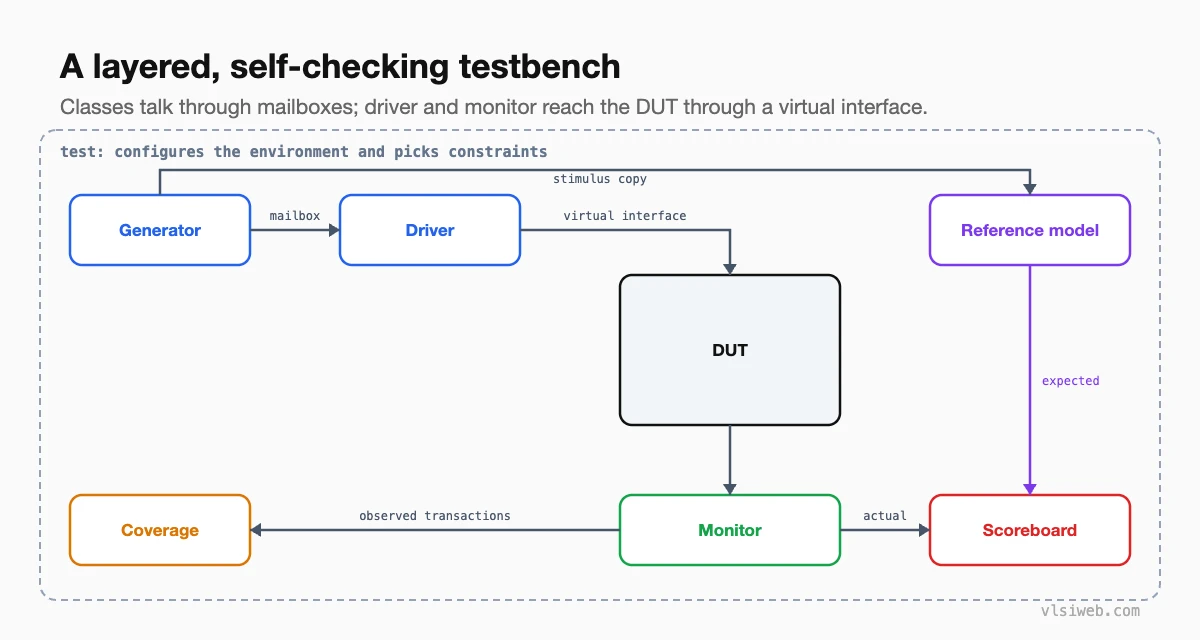
The short answer: A good SystemVerilog testbench is layered: a generator creates randomised transactions, a driver turns them into pin activity through a virtual interface, a monitor turns pin activity back into transactions, a reference model predicts the expected results, a scoreboard compares actual with expected, and coverage records what was exercised. An environment class builds and connects these components, and each test only configures the environment and its constraints. UVM standardises exactly this structure.
Before learning UVM, I recommend building this testbench once by hand. It’s about 300 lines of SystemVerilog, and afterwards UVM stops looking like magic: every UVM class has a counterpart here. This post combines my older posts on testbench architecture, SystemVerilog for verification, advanced verification features, and debugging.
- The architecture
- The components in code
- The environment and the test
- Design choices that matter
- Debugging a failing test
- From here to UVM
Table of Contents
Part 1: The architecture
Part 2: The components in code
class driver;
  virtual stream_if vif;
  mailbox #(txn) in;
  task run();
    forever begin
      txn t; in.get(t);
      @(vif.cb); vif.cb.valid <= 1; vif.cb.data <= t.data;
      do @(vif.cb); while (!vif.cb.ready);
      vif.cb.valid <= 0;
    end
  endtask
endclass

class monitor;
  virtual stream_if vif;
  mailbox #(txn) out;
  task run();
    forever begin
      @(vif.cb);
      if (vif.cb.valid && vif.cb.ready) begin
        txn t = new(); t.data = vif.cb.data; out.put(t);
      end
    end
  endtask
endclass

class scoreboard;
  mailbox #(txn) exp_mb, act_mb;
  int errors, checked;
  task run();
    forever begin
      txn e, a;
      exp_mb.get(e); act_mb.get(a);
      checked++;
      if (a.data !== e.data) begin
        errors++;
        $error("exp %h got %h", e.data, a.data);
      end
    end
  endtask
endclass
Part 3: The environment and the test
class env;
  generator gen; driver drv; monitor mon; ref_model rm; scoreboard sb;
  function new(virtual stream_if vif);
    mailbox #(txn) g2d = new(), g2r = new(), r2s = new(), m2s = new();
    gen = new(g2d, g2r);
    drv = new(vif, g2d);
    mon = new(vif, m2s);
    rm  = new(g2r, r2s);
    sb  = new(r2s, m2s);
  endfunction
  task run(int n);
    fork
      gen.run(n); drv.run(); mon.run(); rm.run(); sb.run();
    join_any
    wait (sb.checked == n);   // done when every transaction is checked
  endtask
endclass

program test(stream_if vif);   // or a module
  initial begin
    env e;
    e = new(vif);
    e.gen.len_max = 4;        // test-specific knob
    e.run(1000);
    $display(e.sb.errors ? "TEST FAILED" : "TEST PASSED");
    $finish;
  end
endprogram
Part 4: Design choices that matter
- Check on the monitor side. The scoreboard compares what the DUT really produced, never what the driver intended to send.
- Keep tests thin. A test changes constraints and configuration; it doesn’t rebuild the environment.
- Make components reusable. A monitor that only observes an interface can be reused at block and chip level (UVM calls this a passive agent).
- Finish cleanly. End when all expected transactions are checked, with a timeout as a safety net, and check that no expected items are left over.
Part 5: Debugging a failing test
- Re-run with the same seed. Print the seed at the start of every run.
- Go to the first error, not the last. Find its time and open the waveform there.
- Decide whether the DUT, the reference model or the stimulus is wrong. Often it’s the model.
- Add transaction-level messages with IDs, so you can follow one transaction from generator to scoreboard.
- Turn a hard-won bug into a directed test or an assertion, so it can never come back silently.
Part 6: From here to UVM
| This testbench | UVM equivalent |
|---|---|
| generator + mailbox | sequence + sequencer |
| driver, monitor | uvm_driver, uvm_monitor (in a uvm_agent) |
| mailbox to scoreboard | analysis port and uvm_tlm_analysis_fifo |
| env | uvm_env |
| test program | uvm_test |
| Passing vif in constructors | uvm_config_db |
| wait for sb.checked | objections |
The design verification interview questions post covers the UVM side in more depth.
Practise this on VLSI Forge
I built VLSI Forge so you can write RTL in your browser, run it on a real simulator and check every signal in the waveform. Free, nothing to install.
Previous in my SystemVerilog series: Functional coverage. Next: DPI.
FAQ
What are the components of a SystemVerilog testbench?
A generator, driver, monitor, reference model, scoreboard and coverage collector, built and connected by an environment and controlled by a test.
Do I need UVM to build a good testbench?
No. A well-structured class-based testbench like this works well for many blocks. UVM adds standardisation and reuse across teams.
Why should the scoreboard use the monitor and not the driver?
Because the monitor reports what actually happened on the DUT’s pins. Using the driver’s intent can hide bugs in the interface itself.
How do I end a random test cleanly?
Stop when the scoreboard has checked the expected number of transactions, with a timeout as a backstop, and report any leftover expected items.
