

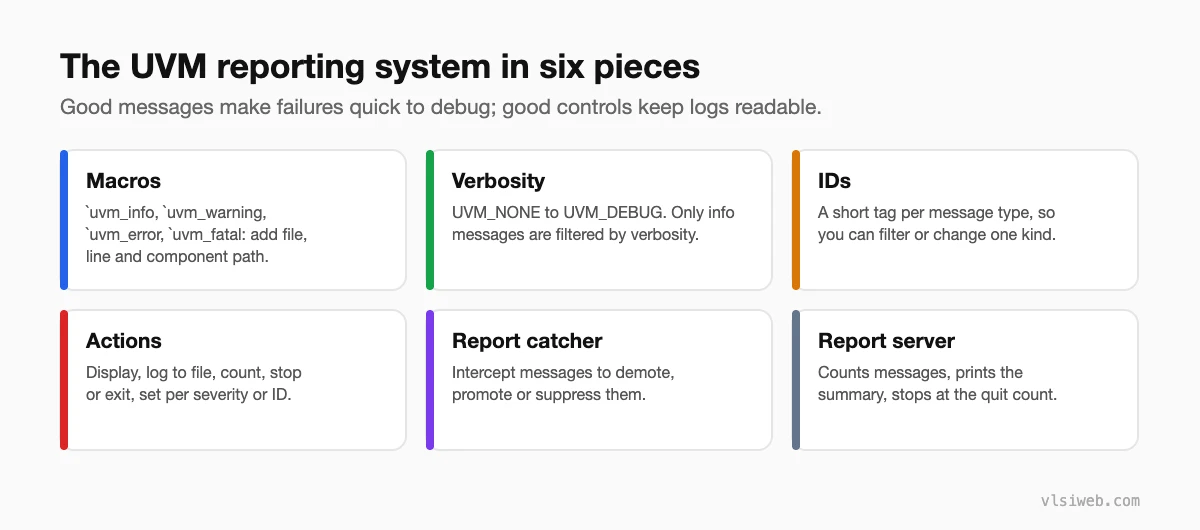
The short answer: UVM reports messages with four macros: `uvm_info (filtered by verbosity), `uvm_warning, `uvm_error and `uvm_fatal. Each message has an ID, a text and the component’s path. You control output with verbosity (UVM_NONE up to UVM_DEBUG), with actions per severity or ID (display, log, count, stop, exit), and with report catchers that can demote or suppress specific messages. The report server counts everything, stops the test after a maximum number of errors and prints the final summary that decides pass or fail.
Messages are the first thing you look at when a test fails. A testbench with clear, well-tagged messages at sensible verbosity levels is much faster to debug than one that prints everything or nothing. This is the last post in my UVM series.
- The pieces
- Writing messages
- Controlling output
- Report catchers
- Deciding pass or fail
- Habits for readable logs
Table of Contents
Part 1: The pieces
Part 2: Writing messages
`uvm_info("DRV", $sformatf("sending %s", req.convert2string()), UVM_HIGH)
`uvm_warning("CFG", "coverage disabled for this agent")
`uvm_error("SB", $sformatf("exp %h got %h", exp, act))
`uvm_fatal("NOVIF", "virtual interface not found")| Verbosity | Use it for |
|---|---|
| UVM_NONE | Always printed (rare: test start/end banners) |
| UVM_LOW | Test-level milestones |
| UVM_MEDIUM | Default level: one line per important event |
| UVM_HIGH | Per-transaction details |
| UVM_FULL / UVM_DEBUG | Deep debug output |
Only `uvm_info is filtered by verbosity; warnings, errors and fatals always print unless their action is changed.
Part 3: Controlling output
// command line
+UVM_VERBOSITY=UVM_HIGH
+uvm_set_verbosity=uvm_test_top.env.agt_in.*,_ALL_,UVM_DEBUG,run
+UVM_MAX_QUIT_COUNT=10

// from a test
env.agt_in.set_report_verbosity_level_hier(UVM_HIGH);
env.set_report_id_action_hier("SLOW", UVM_NO_ACTION);     // silence one ID
set_report_severity_action_hier(UVM_ERROR, UVM_DISPLAY | UVM_COUNT | UVM_LOG);
Part 4: Report catchers
class demote_known_bug extends uvm_report_catcher;
  `uvm_object_utils(demote_known_bug)
  function new(string name = "demote_known_bug"); super.new(name); endfunction
  function action_e catch();
    if (get_severity() == UVM_ERROR && get_id() == "SB" &&
        !uvm_re_match(uvm_glob_to_re("*addr=0000FFF*"), get_message()))
      set_severity(UVM_WARNING);     // known issue, tracked separately
    return THROW;
  endfunction
endclass

// in the test
demote_known_bug c = demote_known_bug::type_id::create("c");
uvm_report_cb::add(null, c);
Use catchers sparingly, with a ticket number in a comment, so known issues don’t silently hide new ones. They’re also handy for negative tests, where an error is expected.
Part 5: Deciding pass or fail
At the end of the run, the report server prints a summary with counts per severity and per ID. Most teams treat a test as passed only if there were zero UVM_ERROR and UVM_FATAL messages, and their regression scripts parse that summary. Print an explicit TEST PASSED / TEST FAILED line in report_phase so humans and scripts agree.
Part 6: Habits for readable logs
- Short, consistent IDs per component or message type (DRV, MON, SB, CFG).
- Use convert2string in messages instead of printing whole objects.
- Keep per-transaction messages at UVM_HIGH so default logs stay small.
- Every `uvm_error should say what was expected and what was seen.
- Never use $display in UVM code; it bypasses all of this.
Practise this on VLSI Forge
I built VLSI Forge so you can write RTL in your browser, run it on a real simulator and check every signal in the waveform. Free, nothing to install.
Design Verification problems · Daily challenge
Previous in my UVM series: Callbacks. That’s the end of my UVM series.
FAQ
What are the UVM reporting macros?
`uvm_info, `uvm_warning, `uvm_error and `uvm_fatal. They add file, line and hierarchical path to each message.
Which messages are affected by verbosity?
Only `uvm_info messages. Warnings, errors and fatals are controlled by actions instead.
How do I stop a test after too many errors?
Set the maximum quit count, for example with +UVM_MAX_QUIT_COUNT=10.
What is a report catcher?
A class that intercepts messages before they’re processed, so you can change their severity, verbosity or action, or suppress them.
